
WhatsApp Refreshes Android Group Info Screen With New Tabs


WhatsApp has officially begun rolling out a significant update to the group information screen for its Android application, aiming to streamline user navigation. Introduced in the recent beta version 2.26.24.2, this update reorganizes the interface by categorizing settings into two primary sections: “Preferences” and “Privacy.” By consolidating various options into these distinct areas, the messaging platform is reducing visual clutter and enabling users to locate specific configurations with greater speed and efficiency. This strategic design shift not only enhances the current user experience but also establishes a scalable framework for future features that the company intends to integrate into the popular mobile messaging ecosystem.
- WhatsApp is restructuring the Android group information interface into distinct Preferences and Privacy tabs.
- The update simplifies navigation by grouping settings into two core organizational categories.
- This interface modification is currently undergoing testing with selected Android beta users.
- The new layout provides a scalable infrastructure for the integration of future application features.
The Group Info Screen Adopts a More Organized Structure
WhatsApp continues to refine its group communication tools to ensure that users can manage high-volume chats effectively. Following the successful implementation of a tabbed navigation system that separated media files from member lists, this latest update represents a more professional approach to interface design. By cleaning up the layout, the company ensures that users are not overwhelmed by an excessive list of settings when they open the group information page.
This new organization makes managing group settings significantly more intuitive and efficient for all users.
The Preferences Tab Simplifies Personalization
Positioned at the top of the information screen, the Preferences tab focuses on the visual and functional customization of the conversation. Users can now easily adjust chat wallpapers, manage media visibility settings, and oversee group-specific storage usage from this centralized hub. This is a welcome change for those who frequently need to clear their device storage or manage data traffic without navigating through multiple sub-menus. 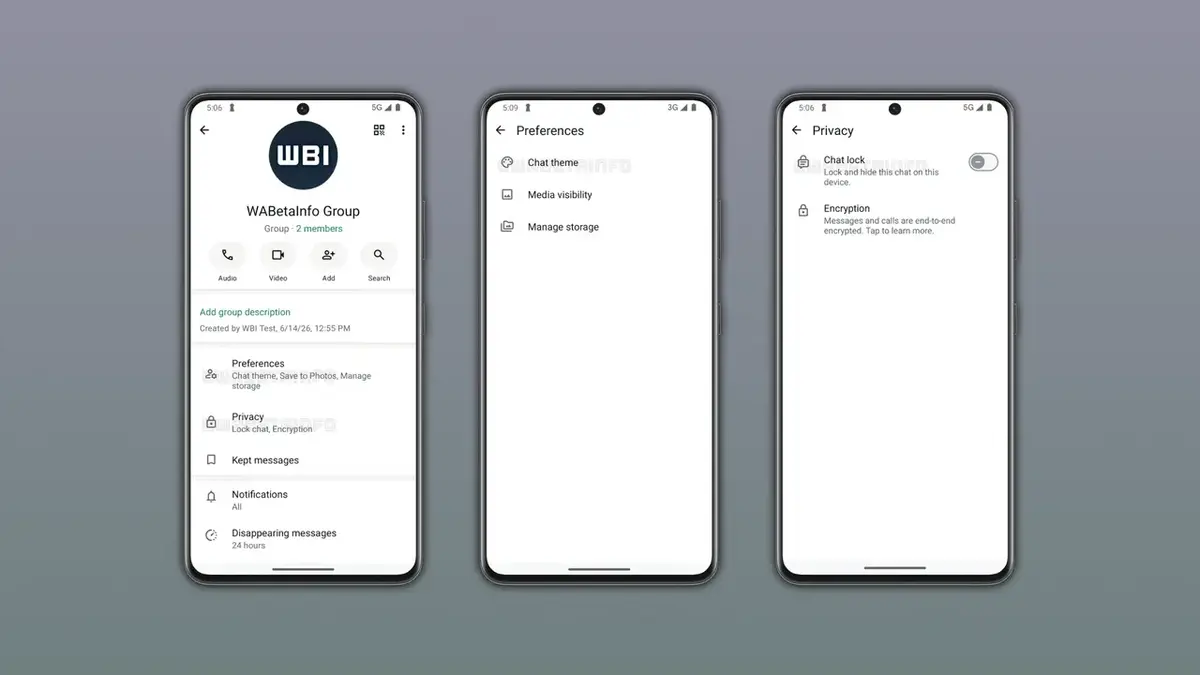
Privacy Settings Are Centralized in One Location
Security remains a top priority for the platform, and the new Privacy tab reflects this commitment. Users can now access essential security features, such as chat lock status and end-to-end encryption details, directly from this dedicated section. This change eliminates the need to jump between different menu levels to verify the security status of a group, providing peace of mind to users concerned about their digital safety.
All critical privacy and security controls are now accessible from a single, unified tab.
The New Layout Prepares for Future Functionalities
This design overhaul serves as a foundation for upcoming enhancements. By anchoring these two sections at the top of the screen, WhatsApp ensures that developers have a logical place to insert new tools as they are released. While the feature is currently restricted to a select group of beta testers, its eventual rollout to the stable version is expected to significantly improve how Android users interact with their group chats. This long-term planning suggests that the application will continue to prioritize user experience as it adds more complex features.
We would like to hear your thoughts on these interface changes. Do you believe that splitting settings into Preferences and Privacy tabs will improve your daily workflow, or do you prefer the old layout? Please share your feedback in the comments section below.
Your comment has been submitted,
it will be published after approval.