
WhatsApp Introduces New Microphone Mode Controls for iOS Calls


WhatsApp has officially rolled out a significant update for iOS users, introducing integrated microphone mode controls directly within the application’s calling interface. Starting with version 26.27.74, users can now manage Apple’s native audio processing settings without leaving the WhatsApp call screen. Previously, these audio adjustments were confined to the iOS Control Center, creating a fragmented user experience. By bringing these controls directly into the app, WhatsApp ensures that users can toggle between different audio profiles seamlessly during active conversations. This update is currently being distributed to specific users, with a full global rollout expected in the coming weeks.
- The latest WhatsApp update enables direct management of Apple’s system-level microphone modes within the calling interface.
- Users can toggle between Voice Isolation and Wide Spectrum modes to optimize audio input based on environmental conditions.
- Selected microphone settings remain persistent, ensuring that preferences are applied automatically to subsequent calls.
- The integration leverages native iOS audio processing capabilities rather than relying on independent third-party algorithms.
This new shortcut empowers users to customize their communication clarity with a single tap during active calls.
Microphone Modes Enhance the Audio Experience
The integration provides direct access to Apple’s versatile microphone modes, which were originally introduced with iOS 15 to improve audio fidelity. The ‘Standard’ mode maintains the system’s default processing, while ‘Voice Isolation’ utilizes advanced filtering to suppress background noise, ensuring that the speaker’s voice remains the primary focus. Conversely, the ‘Wide Spectrum’ mode disables noise suppression, allowing the microphone to capture the full range of ambient sounds, which is particularly beneficial for broadcasting live events or musical performances.
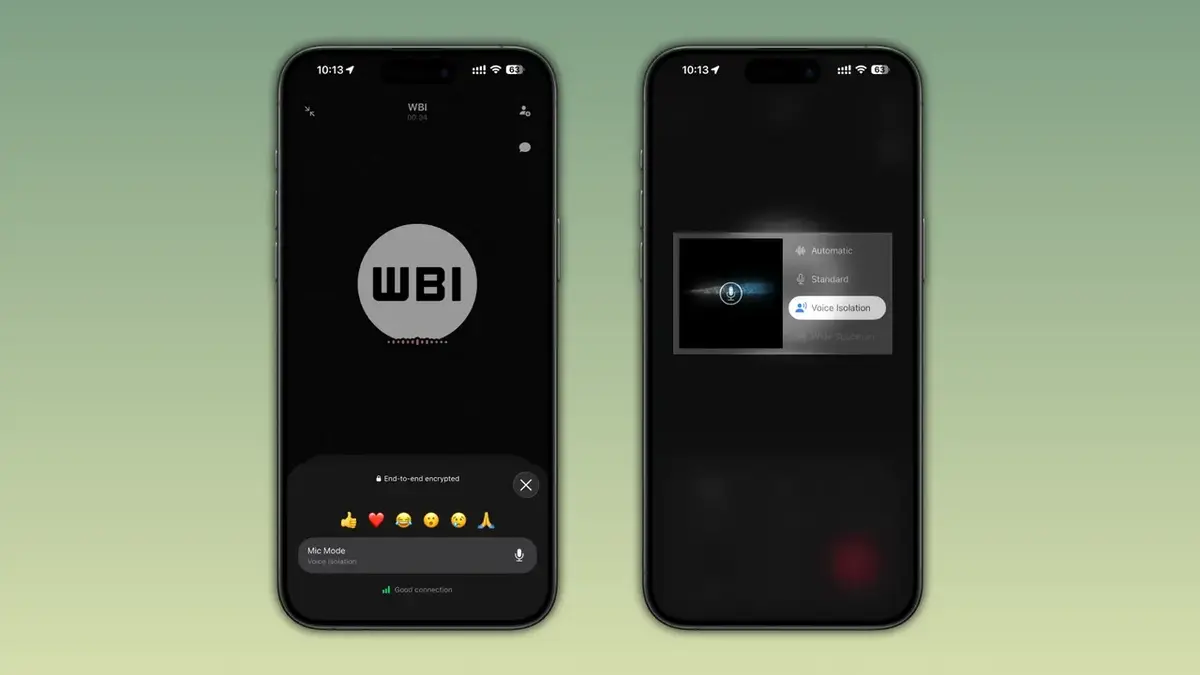
The ‘Automatic’ mode allows the system to intelligently select the most appropriate audio profile based on real-time acoustic conditions. These settings allow for a tailored communication experience that adapts to the user’s specific surroundings.
The Integration Simplifies Audio Management
Previously, users had to navigate away from the WhatsApp interface and open the iOS Control Center to adjust these audio parameters. This cumbersome process often led many users to overlook the availability of these high-quality audio features entirely. By embedding these controls into the call UI, WhatsApp has successfully reduced the friction involved in managing audio quality. This strategic move is especially valuable for users who frequently participate in calls from busy or noisy public environments, as it allows for immediate adjustments without interrupting the flow of conversation.
WhatsApp’s new integration enables users to optimize audio quality without ever exiting the calling screen.
System Architecture Differentiates iOS and Android
A notable distinction exists between the platforms, as WhatsApp utilizes its own proprietary noise-cancellation algorithms on Android, while relying on Apple’s robust system-level processing on iOS. This approach demonstrates WhatsApp’s commitment to leveraging the unique hardware and software capabilities inherent to each operating system. Furthermore, the decision to make these settings persistent ensures that users do not need to reconfigure their preferences, leading to a more streamlined and reliable user experience across all calls.
The Update Continues to Roll Out Gradually
While the feature is currently being deployed, it may not be immediately available to every user worldwide. Those who have updated their application via the App Store will gradually see these options appear within their calling interface as the server-side update propagates. For users who do not yet see the controls, availability is expected to expand significantly over the next few weeks as part of the standard phased release schedule.
We are curious to know how this new microphone mode shortcut impacts your daily communication habits. Do you find yourself using ‘Voice Isolation’ to block out noise, or do you prefer the ‘Wide Spectrum’ mode for a more natural audio feel? Please share your experiences and thoughts in the comments section below.
Your comment has been submitted,
it will be published after approval.