
WhatsApp iOS Rolls Out Custom Emoji Reactions for Subscribers

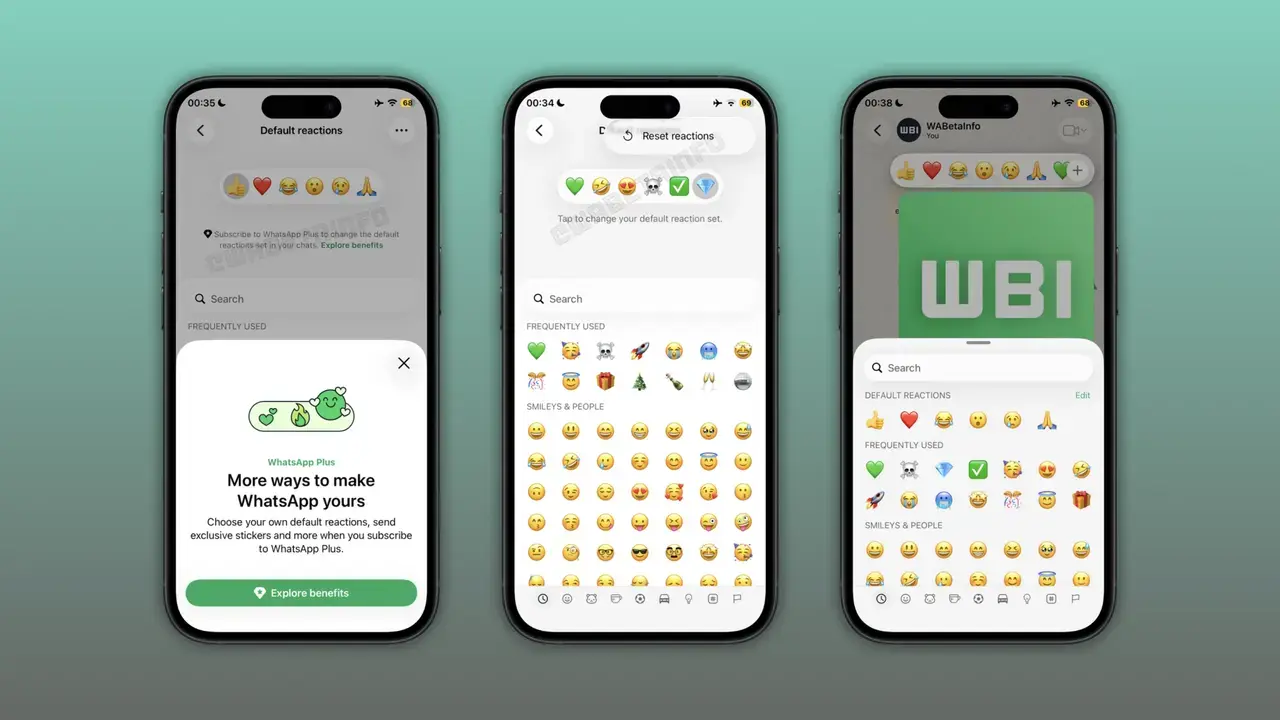
WhatsApp is gradually introducing its highly anticipated custom emoji reactions feature for iOS users, beginning with beta version 26.38.10.16. This new functionality allows WhatsApp Plus subscribers to personalize the six default emojis found in the reaction tray, replacing them with their preferred choices. Users can modify their reaction tray either through the app’s settings or directly via the emoji keyboard. Initially launched on Android, the feature is now being integrated into the Apple ecosystem, aiming to speed up user responses to messages and provide a more personalized communication experience.
- WhatsApp has released a custom emoji reactions feature for iOS beta testers.
- Subscribers can now replace the six default emojis in the reaction tray with custom icons.
- The feature is accessible and manageable through both application settings and the emoji keyboard.
- This customization capability is exclusively available to WhatsApp Plus subscribers.
Feature is Being Released for iOS Beta Testers
WhatsApp is enhancing user experience by bringing its customizable reaction tray to the iOS platform. The latest update, distributed via TestFlight as WhatsApp beta 26.38.10.16, grants select beta testers access to this new functionality. This move is part of the company’s broader strategy to make the messaging platform more adaptable and user-centric.
Users Can Easily Edit Their Reaction Tray
For those eager to personalize their reaction tray, the process is straightforward. Users can navigate to the app’s settings menu and quickly swap out each default emoji. Tapping on a specific emoji opens the full emoji keyboard, offering an extensive selection to choose from. Once changes are saved, the app automatically displays the updated list the next time a reaction is sent.
Editing Through the Keyboard Streamlines the Process
Mirroring the Android experience, iOS users can also manage their reaction tray directly from the emoji keyboard. When initiating a message reaction, users can tap the ‘Edit’ button located at the top of the reaction tray. This provides a quick way to make adjustments without needing to navigate away to the main settings menu. This design ensures users can personalize their experience without disrupting their messaging flow.
Subscription Status Affects Feature Access
The ability to customize emoji reactions is currently tied to existing subscription plans. Users without an active subscription can see how the reaction tray functions but are unable to modify its contents. This acts as a preview for non-subscribers, offering a glimpse into the benefits of WhatsApp Plus and encouraging consideration of its premium features.
WhatsApp Plus Continues to Evolve with New Features
Custom emoji reactions represent the second feature set introduced for WhatsApp Plus subscribers. This subscription model has previously rolled out enhancements such as custom themes, app icons, and advanced chat pinning. The platform continues to grow its subscription offerings with a focus on personalization, and the company aims to introduce more tools for subscribers in the future.
What emojis would you add to your reaction tray to enhance your messaging experience? Share your thoughts on WhatsApp’s new customization option in the comments below!
Your comment has been submitted,
it will be published after approval.