
WhatsApp iOS Update Refines Chat Interface and Navigation


WhatsApp has officially rolled out a significant update, version 26.39.75, for its iOS application, which enhances the Liquid Glass design by introducing a new chat navigation button. This WhatsApp iOS update focuses on improving readability for users by effectively separating contact information from the chat wallpaper, addressing previous concerns regarding text visibility. By centralizing profile details and status information into a dedicated, semi-transparent interface element, the platform ensures that users can easily identify their conversation partners regardless of the background imagery used. This strategic design shift marks a crucial step in balancing the modern, translucent aesthetic of the app with functional usability requirements for all users.
- The update introduces a dedicated navigation button to improve contact name readability against complex wallpapers.
- Version 26.39.75 integrates a new semi-transparent menu that provides direct access to essential chat tools.
- New shortcuts enable faster management of individual chats, group settings, and business account preferences.
Readability Issues are Addressed by the New Interface
The implementation of the Liquid Glass design in earlier versions, specifically 26.35.72, aimed to align WhatsApp with Apple’s modern visual language. While aesthetically pleasing, the high degree of transparency often caused text to blend into the background, making it difficult for users to read contact names. This issue was particularly prominent for users utilizing vibrant or highly detailed chat wallpapers.
The new navigation button effectively solves this by housing the profile picture, name, and online status within a distinct UI element that maintains a subtle visual harmony with the background without compromising legibility. 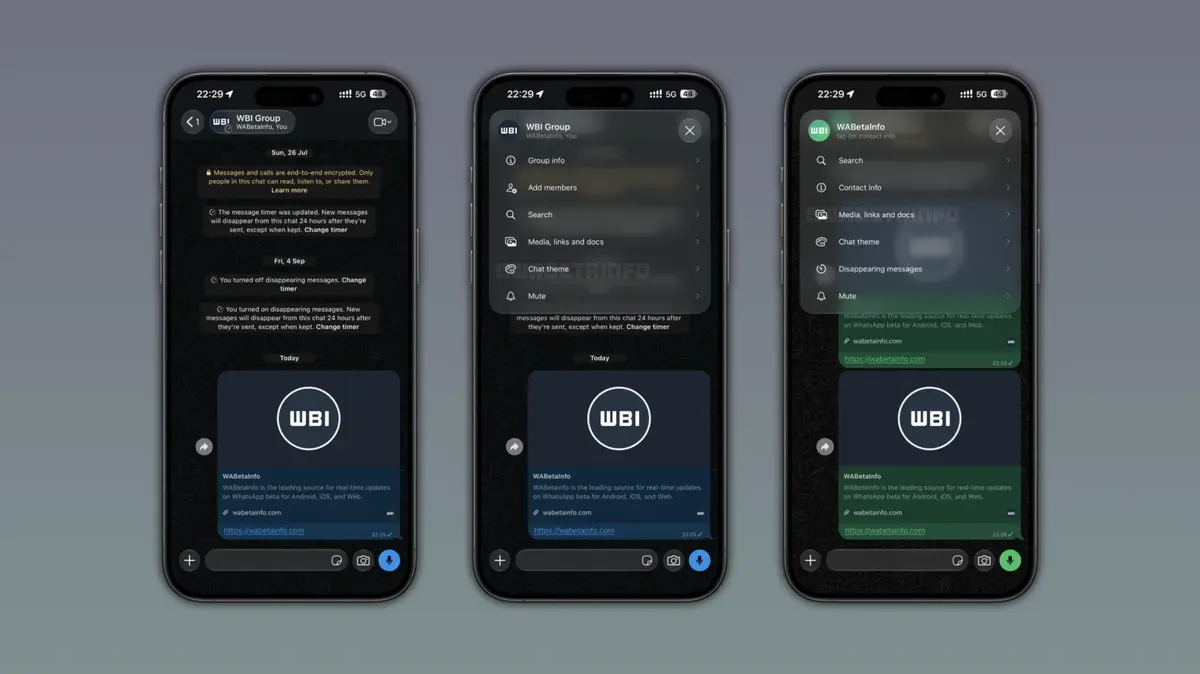 This ensures that information remains clear and accessible at all times, demonstrating the company’s commitment to refining the user experience through iterative design improvements rather than purely cosmetic changes.
Functional Menus are Integrated for Faster Access
Beyond visual improvements, the update introduces a highly functional menu that appears when users interact with the new navigation button. This semi-transparent overlay maintains the Liquid Glass aesthetic while significantly streamlining the workflow for common tasks. Users no longer need to navigate deep into the contact information settings to modify basic chat preferences.
For individual conversations, the menu provides six essential shortcuts, including voice and video calling, contact details, media file access, chat theme adjustments, disappearing messages, and muting options. This consolidation of tools reduces the number of taps required to manage conversation settings, catering to power users who frequently switch between different administrative tasks. The efficiency gain is particularly noticeable for those who frequently share or retrieve documents and media files within their chats.
Group Management Options are Expanded
The utility of the new interface extends to group chats and business accounts as well. In group environments, the menu includes standard shortcuts along with an additional option for adding new participants. This modification simplifies group management by allowing administrators to perform essential actions directly from the main chat window. Similarly, business accounts receive a specialized menu tailored to their unique features, ensuring that professionals can manage their client interactions with greater speed and convenience.
As this feature is currently being rolled out to users with the Liquid Glass interface enabled, it represents a calculated evolution of the mobile messaging experience. While the update is not yet available to every single user, it establishes a new standard for how information is displayed and accessed within the app.
We would love to hear your thoughts on these design changes; do you feel the new navigation menu and the enhanced Liquid Glass interface make your daily messaging more efficient, or do you prefer the previous layout? Share your experiences in the comments section below.
Your comment has been submitted,
it will be published after approval.