
Advertising era has started in Windows 11!

Microsoft has started releasing monthly security and feature updates for Windows 11 as part of the May package. A change in this month’s update has caused criticism. The company started adding ads to the Windows 11 Start menu.
Windows 11 will show advertising applications in the Start menu
With the KB5037771 package, Windows 11 versions 22H2 and 23H2 have undergone a significant change. Microsoft now shows apps from the Microsoft Store in the Start menu. This menu, which is separated as the “Recommended” section, includes app ads.
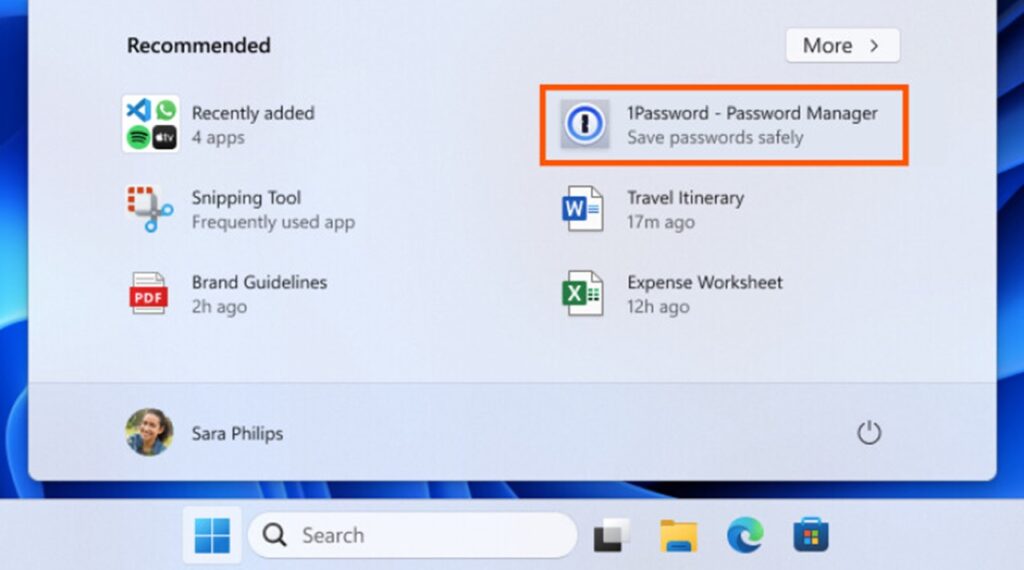
Microsoft believes that this support is for the benefit of users. The company said that developers can discover new applications more easily. However, many users are uncomfortable with the display of advertisements in the operating system.
54541221
Microsoft started testing this concept in Windows Insider editions last month. It received significant negative feedback from users who were annoyed by ads appearing in the Start menu. But with package KB5037771, it has now been expanded to more users.
Still, the option to disable “recommended” apps in the Start menu should not be ignored. You can turn off the “Show suggestions” option by going to Personalization and Start menu in the Settings app.
The addition of advertising apps to the Start menu has also fueled speculation that Windows will adopt a subscription-based model. There are rumors that Microsoft will charge users a monthly license fee with Windows 12.
So what do you think about the advertising decision for Windows 11? You can share your opinions with us in the Comments section below.
Your comment has been submitted,
it will be published after approval.