
Revolutionary AI Overhaul for WhatsApp

The AI revolution, which has been sweeping through the tech world, is now establishing itself at the very heart of the world’s most popular messaging app, WhatsApp. Meta is taking its long-tested AI integration to the next level by preparing a fundamental redesign of the WhatsApp interface.
The latest beta version released for Android users has revealed a dedicated “Meta AI” tab in the bottom navigation bar. This move serves as concrete evidence of Meta’s vision to transform WhatsApp from a simple messaging tool into a comprehensive AI assistant.
Farewell to the Floating Button: A Cleaner Interface
Discovered in the WhatsApp Android 2.26.10.5 beta update via the Google Play Store, this new design completely reimagines the user experience. The animated AI floating action button (FAB), which many users found “distracting” or “cluttered” as it hovered over the chat list, is finally being phased out. To resolve this clutter, Meta has centralized all AI tools under a single new tab in the main bottom menu.
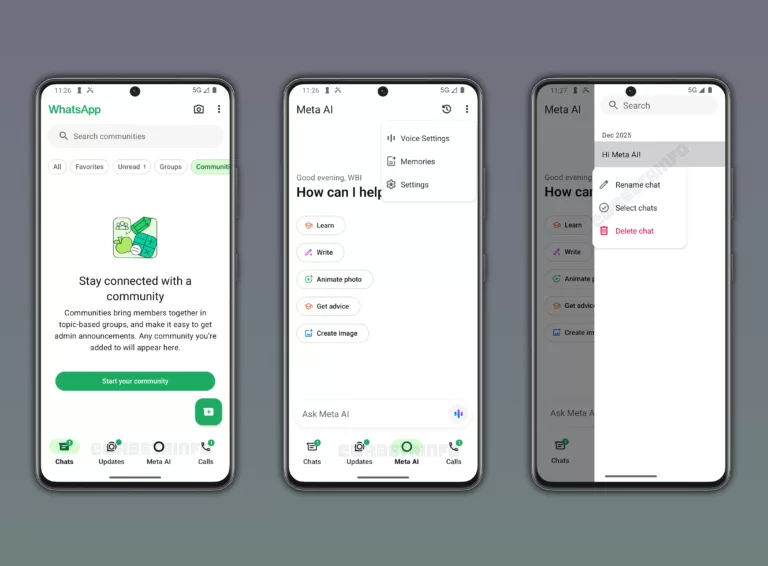
What happens to the Communities tab? To make room for this high-priority feature, the Communities tab is being removed from the main navigation bar. Instead, it is being moved into the “Chats” menu as a filter. This relocation ensures a cleaner chat list while making AI interaction as simple as a single tap.
Smart Chat History and Voice Calls: Just Like ChatGPT and Gemini
Upon entering the new Meta AI tab, users are greeted by a highly capable virtual assistant. The hub isn’t just for text commands; it allows users to:
- Generate Images: Create new visuals or animate existing photos in seconds.
- Voice Conversations: Start real-time, fluid voice calls with Meta AI by tapping the microphone icon in the bottom bar, allowing for natural language interaction.
- Smart Organization: Similar to ChatGPT or Google Gemini, every new topic starts a separate chat thread. Meta AI analyzes the content and automatically assigns a title to each conversation.
This organized history makes it easy to jump back into a weeks-old brainstorming session or find a specific recipe without digging through message logs. Additionally, an overflow menu in the top right allows users to manage the AI’s “memory” and view all shared media in one place.
Currently available to a limited beta group in regions like India, Indonesia, and the United States, this feature highlights WhatsApp’s future trajectory. Once refined, this update is expected to roll out globally in the coming weeks, potentially rewriting our smartphone usage habits.
Your comment has been submitted,
it will be published after approval.