
A Game-Changer for Mobile Players Arrives with Android 17

The mobile gaming world has waited years for this critical feature, and it has finally become a reality. With the release of the Android 17 Beta 2, Google has introduced “Controller Remapping,” a feature that enables system-level customization of gaming controllers. Players are no longer at the mercy of third-party apps or limited in-game settings; every button on a controller can now be reassigned directly through the Android OS.
System-Wide Validity: Set Once, Use Everywhere
Android 17’s new capability operates at the system level rather than on a per-app basis. This means a single button configuration will apply to all games and emulators. The “muscle memory” confusion often faced by players switching between consoles (PlayStation, Xbox, Nintendo) is now a thing of the past.
What Does the New Feature Include?
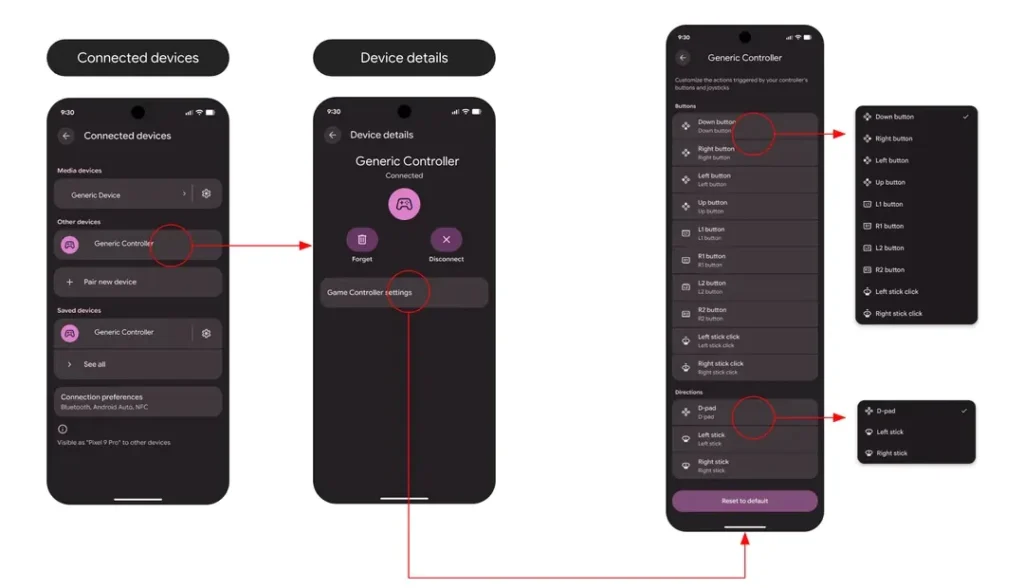
- Button Swapping: Freely swap the positions of the Square, Triangle, X, and Circle (or A, B, X, Y) buttons.
- Trigger and Stick Customization: Reassign L2/R2 triggers or the click functions (L3/R3) of the analog sticks to different buttons.
- Axis Exchange: Transfer the functions of the D-Pad and analog sticks to one another.
- Accessibility Support: Players with physical limitations can remap hard-to-reach buttons to more accessible ones.
Step-by-Step: How to Configure Controller Settings in Android 17
The feature is fully compatible with both wired and Bluetooth controllers. Access paths vary by connection type:
- Wired Controllers: Navigate to Settings > System > Game Controller and select your connected device.
- Bluetooth Controllers: Go to Settings > Connected Devices > [Settings icon next to your device] > Device Details > Game Controller Settings.
Advanced Compatibility: Turn Touch into Physical Input
Another surprise in Android 17 is the “Touch-to-Physical Mapping” technology. This allows players to map controller buttons to virtual on-screen buttons, even in games that lack native controller support. Consequently, games designed solely for touchscreens can now be played with the comfort of a gamepad.
Who Can Use It Right Now?
The feature is currently available for testing on devices running Android 17 Beta 2 (Pixel 6 and later, as well as select OnePlus and Oppo models). The stable version is expected to reach general availability in the last quarter of 2026. As it is in the beta phase, minor bugs—such as incorrect controller icons—may occur.
Your comment has been submitted,
it will be published after approval.