Google is set to enhance its mobile operating system with the upcoming Android 17 background blur feature, which leaks suggest will be applied system-wide. This visual update aims to give the user interface a more modern and layered feel, building upon foundations laid in previous versions. The change is expected to create a more cohesive and aesthetically pleasing experience for users across the platform.
What We Know About the Android 17 Background Blur
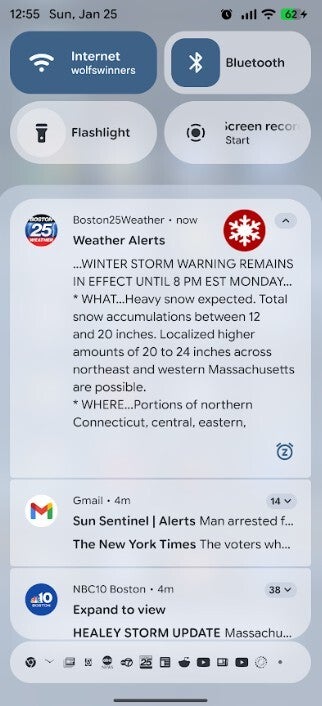
The background blur effect was first introduced in select areas with Android 16’s Material 3 Expressive design language, appearing in the Quick Settings and Notification Panel. This feature works by slightly blurring the background content, such as the home screen or an app, when a foreground menu is active. According to Google, this approach adds a sense of depth to the interface and helps focus the user’s attention on the primary content.
However, with Android 17, this aesthetic touch is expected to be much more widespread. When you open the app drawer or view the recent apps menu, you will likely see a blurred version of your wallpaper or the previous app, offering a more elegant experience than a solid color block. Furthermore, leaked information suggests that even the volume adjustment bar will adopt a semi-transparent “frosted glass” appearance, subtly blurring the content behind it.
How to Disable the New Blur Effect
While many users may appreciate this visual enhancement, it can be distracting for some. Fortunately, Google has considered this and provides an option to disable the blur effect. If you prefer a simpler look, you can turn off the feature by following these steps:
- Open the Settings menu.
- Navigate to the Accessibility section.
- Tap on the Color and motion option.
- Enable the toggle for “Disable background blurs” (or a similar option like “Reduce transparency and blur”).
In conclusion, Android 17, codenamed “Cinnamon Bun,” is shaping up to be a refinement and extension of the Material 3 Expressive design language introduced with Android 16, rather than a complete overhaul. These subtle but impactful visual touches will contribute to a more consistent and polished Android ecosystem.
So, what are your thoughts on the Android 17 background blur feature? Share your opinions with us in the comments!