
DuckDuckGo Now Blocks YouTube Ads Directly in Browser

Privacy-focused company DuckDuckGo has officially launched a new feature that automatically blocks intrusive advertisements on YouTube. This update, rolled out for desktop and mobile versions of its browser, provides users with a seamless, ad-free experience without requiring third-party extensions. By integrating advanced filtering technology, the platform effectively removes mid-roll and pre-roll advertisements that have increasingly cluttered the YouTube interface. This strategic move positions DuckDuckGo as a significant alternative to Google’s browser ecosystem, especially as competition between content platforms and ad-blocking software intensifies globally.
- The new ad-blocking capability is enabled by default for all users running the latest version of the DuckDuckGo browser on Windows, macOS, and iOS.
- The system utilizes a combination of uBlock Origin’s extensive filter lists and proprietary DuckDuckGo compatibility rules to ensure performance.
- Users retain full access to their YouTube accounts, including playback history and personal watch lists, despite the active ad-blocking measures.
This update marks a significant shift in how users access digital video content without compromising their privacy or browsing efficiency.
Google Intensifies Efforts Against Ad Blockers
In recent years, YouTube has adopted a more aggressive advertising strategy to drive revenue and encourage users to subscribe to its Premium service. This shift has resulted in longer, unskippable, and more frequent advertisements for free-tier users. Furthermore, Google has implemented structural changes to the Chromium architecture that limit the effectiveness of traditional ad-blocking extensions.
By bypassing the need for external plugins, DuckDuckGo has successfully circumvented these limitations. The company’s decision to build this feature directly into its browser demonstrates a commitment to providing a user-centric environment that challenges the dominant advertising models of major tech conglomerates.
Compatibility Across Different Platforms Expands
The new anti-advertising mechanism is currently active by default on Windows, Mac, and iOS versions of the browser. Android users, however, currently need to manually toggle the feature within the settings menu, though the company plans to make it a default setting in the near future. It is important to note that this functionality is limited to the browser-based version of YouTube; it does not extend to the native YouTube mobile application.
Technical Trade-offs Impact Initial Loading Times
While the service is entirely free, users may notice minor technical adjustments. Google often implements server-side scripts that detect ad-blocking attempts and artificially delay video delivery. Consequently, some users might experience a brief black screen or buffering period when first opening a video. Once the initial hurdle is cleared, the viewing experience remains smooth and uninterrupted by further commercial breaks.
Difference Between Standard Blocking and Duck Player Persists
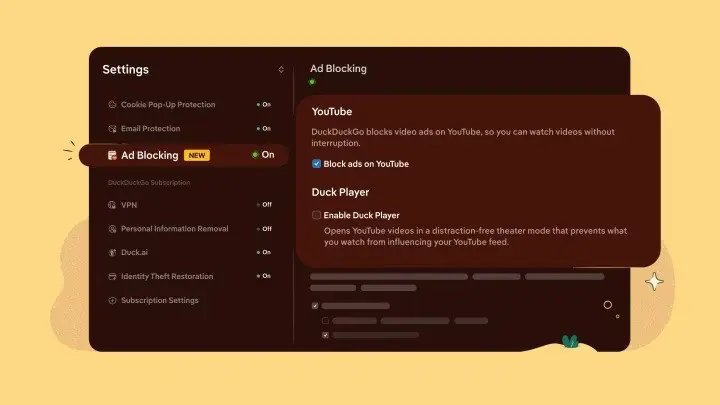
Users often confuse this new feature with the existing “Duck Player” tool, but they function differently. While the Duck Player strips away comments and recommendations to provide a distraction-free, privacy-focused viewing mode, the new ad-blocking feature preserves the standard YouTube interface. This allows users to enjoy their favorite videos while retaining access to core social features like comments and likes.
Do you believe that browser-based ad blocking is the future of digital privacy, or do you prefer to support creators through standard ad models? Share your thoughts with us in the comments section below.
Your comment has been submitted,
it will be published after approval.