
Google Integrates Gemini AI Directly into Android Chrome Browser

Google has officially commenced testing a significant interface update for the Chrome browser on Android, which introduces a dedicated shortcut to its Gemini AI chatbot. This rollout, detected by users on the stable version of the application, aims to streamline access to Google’s artificial intelligence services by placing a prominent Gemini icon within a newly designed navigation bar at the bottom of the screen. By bypassing the need for manual navigation or separate app launches, Google is attempting to make generative AI a core component of the mobile browsing experience for millions of users worldwide.
- Google is testing a bottom navigation bar that includes a direct shortcut to the Gemini chatbot.
- The feature is currently being deployed via a server-side update to select Android users.
- Users retain the ability to customize their interface layout despite the introduction of the new toolbar.
New Navigation Bar Enhances Access to Gemini
The current Chrome interface typically reserves the top portion of the screen for the URL bar, menu options, and navigation controls. With this experimental update, Google is testing a secondary, dedicated toolbar at the bottom of the interface. This space houses the new Gemini icon alongside existing tab management controls, creating a more crowded but potentially more functional workspace for heavy users of generative AI tools. 
The integration of AI directly into the browser navigation reflects Google’s strategy to prioritize Gemini as a primary utility for mobile users.
While users have historically enjoyed the flexibility to move browser controls to the bottom for better ergonomics, this update introduces a more vertical layout. When both the browser controls and the new Gemini toolbar are active, the bottom section of the screen becomes significantly larger. This design choice represents a trade-off between screen real estate and accessibility, which may require adjustment for some mobile device users.
Staged Rollout Strategy Ensures Gradual Deployment
This update is being delivered through a server-side switch rather than a traditional application update via the Play Store. Consequently, the feature is not immediately available to every user, and Google has not provided a specific timeline for a full, global release. The company is currently monitoring user feedback and interface performance during this initial phase. 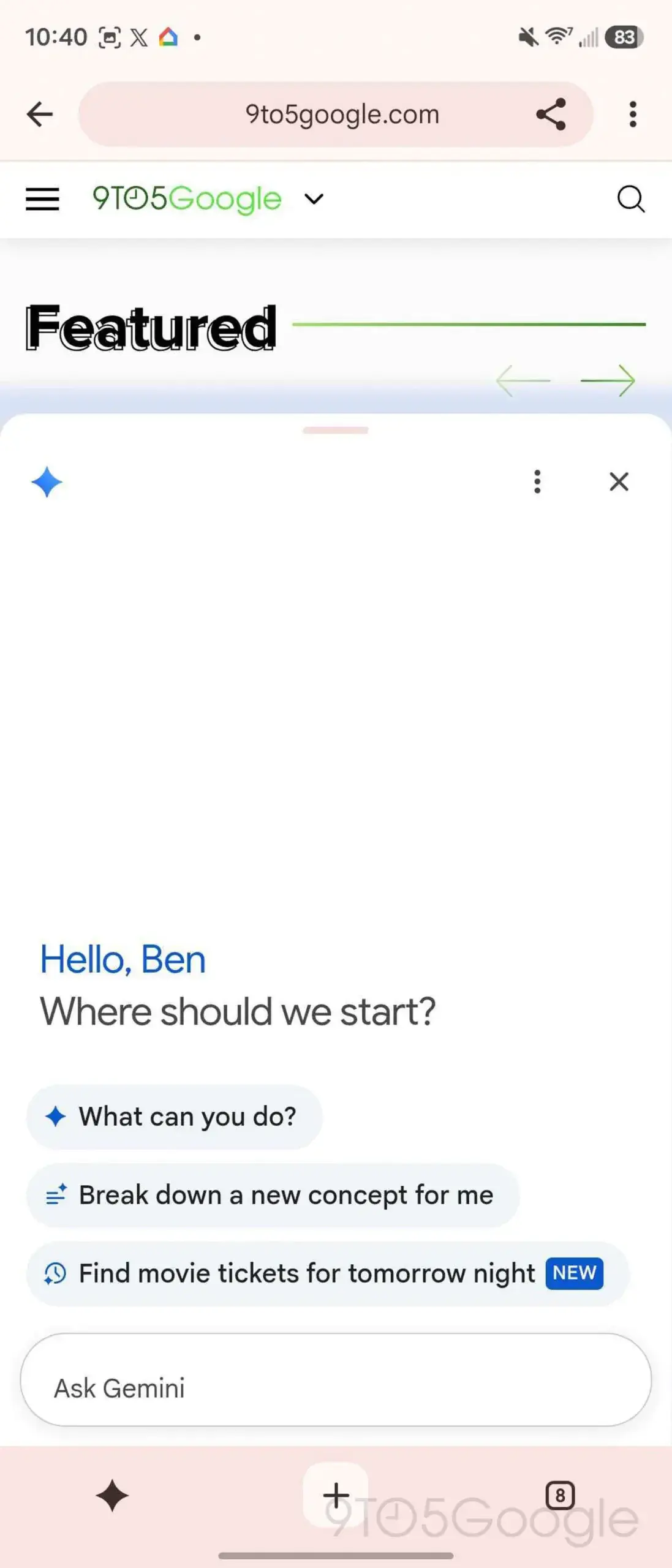
Google continues to refine the browser interface to accommodate the growing demand for rapid AI interaction.
As the rollout continues in a staged manner, the browsing experience on Android may soon look quite different for the average consumer. While some may find the added bar to be a minor visual distraction, those who rely on Gemini for research, translation, or content generation will likely view this as a major productivity enhancement. For now, users on the stable version of Chrome should keep an eye on their interface for the appearance of this new icon, as no beta registration is required to potentially receive the update.
We are interested in hearing your thoughts on this design change; do you believe having a permanent AI shortcut on your mobile browser will improve your daily workflow, or would you prefer a cleaner interface?
Your comment has been submitted,
it will be published after approval.