
Google Integrates Gemini AI into Chrome Autofill for Gmail

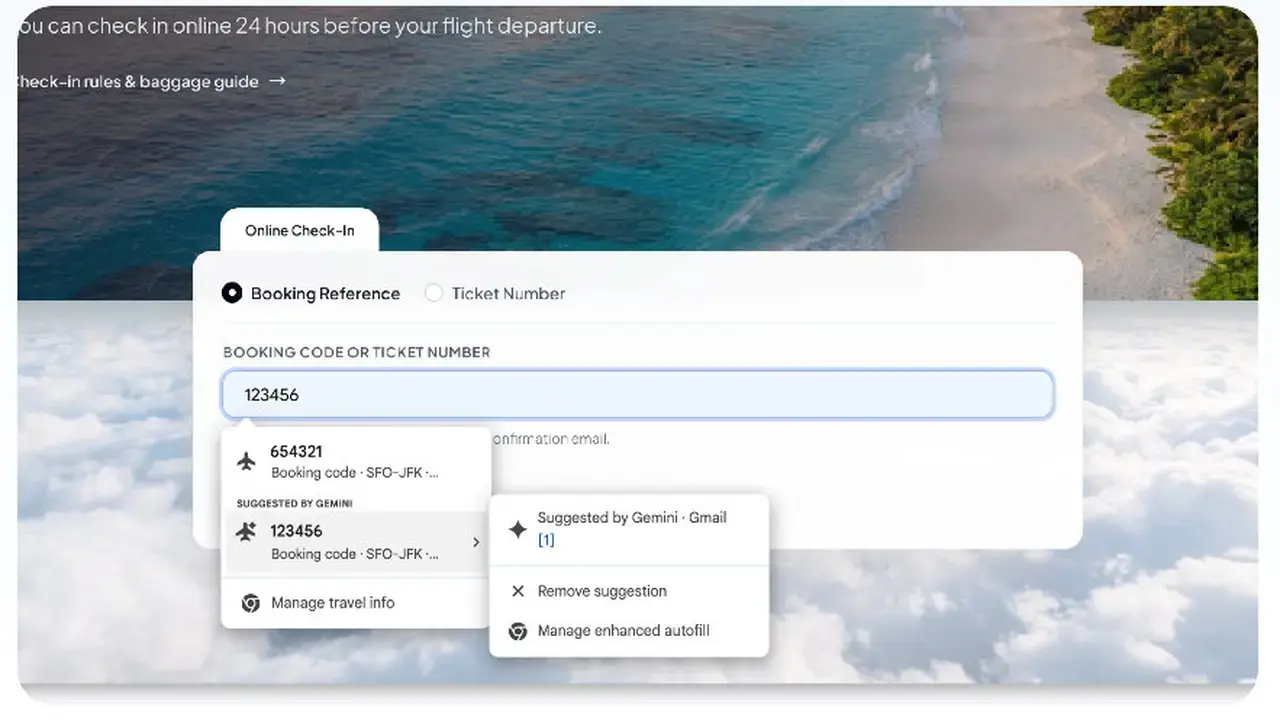
Google has officially announced a significant update to its Chrome web browser, introducing Gemini-powered AI capabilities to the native Autofill feature. By integrating Gmail data directly into the browser’s form-filling workflow, Google aims to streamline how users input their personal information across various websites. This update, unveiled recently, shifts Chrome from a static data storage tool to a dynamic, context-aware assistant. By leveraging Google’s advanced Gemini artificial intelligence model, the browser can now intelligently parse information from a user’s inbox to complete forms more efficiently, ultimately saving time and reducing the need for manual data entry.
- Google incorporates Gemini AI into the Chrome Autofill system to enable direct Gmail integration.
- The new feature allows the browser to extract and populate form fields using dynamic content from user emails.
- Enhanced artificial intelligence algorithms manage sensitive personal data such as addresses and payment details securely.
Static Data Systems are Being Replaced by Intelligent Solutions
For years, the Google Chrome Autofill function relied exclusively on static profiles pre-populated by the user. Individuals were required to manually input their physical addresses, phone numbers, and payment details into the browser settings to ensure subsequent forms could be filled out quickly. This traditional method, while functional, lacked the flexibility required for modern web interactions where user data often changes or varies by context.
With the integration of Gemini, Chrome now gains the ability to analyze information stored within a user’s Gmail account. This transition marks a shift toward contextual intelligence, where the browser understands the purpose of a form and retrieves the relevant, up-to-date information directly from the user’s communications. Whether a user is completing a complex registration form or finalizing a purchase at an online checkout, the AI acts as a bridge between the inbox and the web form.
Artificial Intelligence Becomes Central to the Browser Experience
This strategic move underscores Google’s broader initiative to position Gemini at the core of its browser ecosystem. Rather than treating AI as a separate chatbot interface, Google is embedding these powerful models directly into the browser’s infrastructure. By doing so, the company seeks to assist users with their daily digital tasks, transforming Chrome into a personalized productivity tool rather than just a navigation engine.
Security remains a primary concern during this transition. Google has emphasized that it is implementing strict privacy policies to govern how data is processed during these AI-assisted interactions. The company asserts that the extraction of information from emails is handled with user safety as a top priority, ensuring that only necessary data is utilized to complete specific tasks without compromising personal privacy.
Efficiency Standards are Being Elevated for Professionals
The implications of this update are particularly significant for professional users who frequently navigate multiple web forms throughout their workday. By eliminating the need for repetitive copy-pasting or manual typing, this feature promises to enhance digital efficiency across the board. As Google continues to refine these automated capabilities, it is likely that the browser will evolve into an increasingly proactive digital assistant.
This technological advancement serves as a clear indication of Google’s commitment to maintaining its market leadership by continuously innovating its software tools. By weaving Gemini into the fabric of Chrome, Google is setting a new benchmark for how browsers should interact with user data in the age of artificial intelligence. Future updates are expected to further refine these integrations, potentially expanding the scope of what the browser can autonomously handle on behalf of the user.
How much time do you anticipate saving in your daily tasks if your browser can automatically extract information from your emails? We invite you to share your thoughts on this AI-powered convenience and your perspective on data privacy in the comments section below.
Your comment has been submitted,
it will be published after approval.