
How to Track iOS 27 Indexing Progress on iPhone

Following the recent release of the iOS 27 beta 1 update, many iPhone users have reported a persistent ‘Indexing in Progress’ notification on their devices. This extensive background process is triggered by the integration of advanced Apple Intelligence models and updated core Apple Foundation frameworks, which require a complete re-indexing of device data to optimize search functionality. While Apple maintains that this system activity is vital for performance improvements, the standard iOS interface does not provide a clear percentage indicator, often leaving users uncertain about the status of the operation. Fortunately, Mac users can access detailed technical logs to monitor the exact progress of this indexing phase.
- The iOS 27 update necessitates a full re-indexing of device content to support new Apple Intelligence features.
- The native iPhone Settings menu fails to display a granular progress percentage for the ongoing indexing task.
- Users can monitor the precise completion status by accessing system logs through the Console application on a Mac.
- Device data volume and charging habits significantly influence the total duration of the re-indexing process.
Indexing speed is primarily determined by the volume of local files and the amount of time the device spends connected to a power source.
How You Can Track Indexing Progress via Mac
If you are frustrated by the lack of visibility regarding your iPhone’s background tasks, you can utilize your Mac to extract specific system data. Begin by connecting your iPhone to your Mac using a reliable data cable. Once connected, open the ‘Console’ application on your macOS device. It is essential to navigate to the ‘Action’ menu and ensure that ‘Include Debug Messages’ is enabled, as this setting is required to filter the necessary system logs correctly. 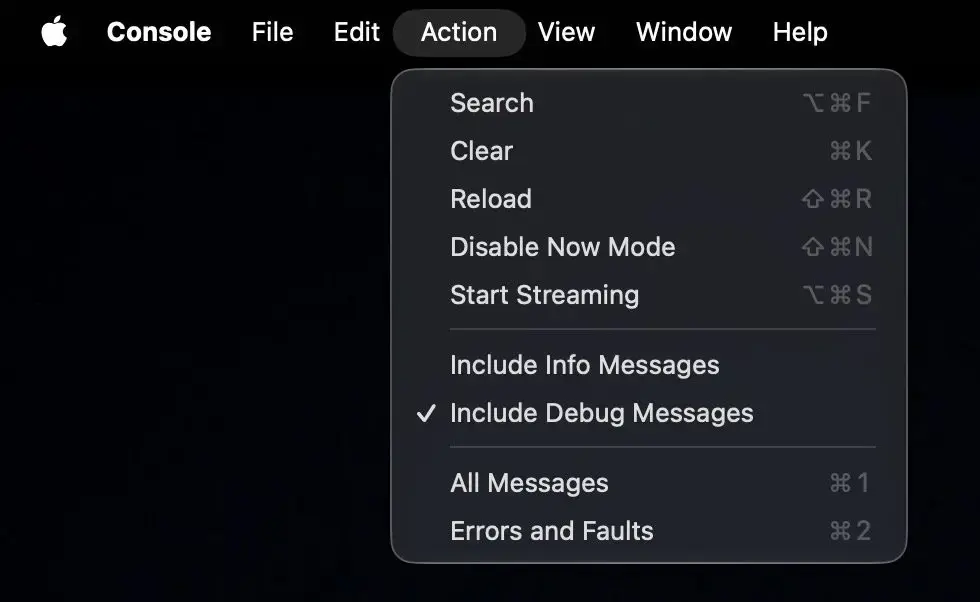
With the Console application running, select your connected iPhone from the sidebar located on the left side of the window. In the search bar, input the phrase ‘spotlight indexing progress’ to isolate the relevant system events. After initiating this search, navigate to the Settings menu on your iPhone; this action frequently triggers the system to broadcast its current indexing status to the Console log. 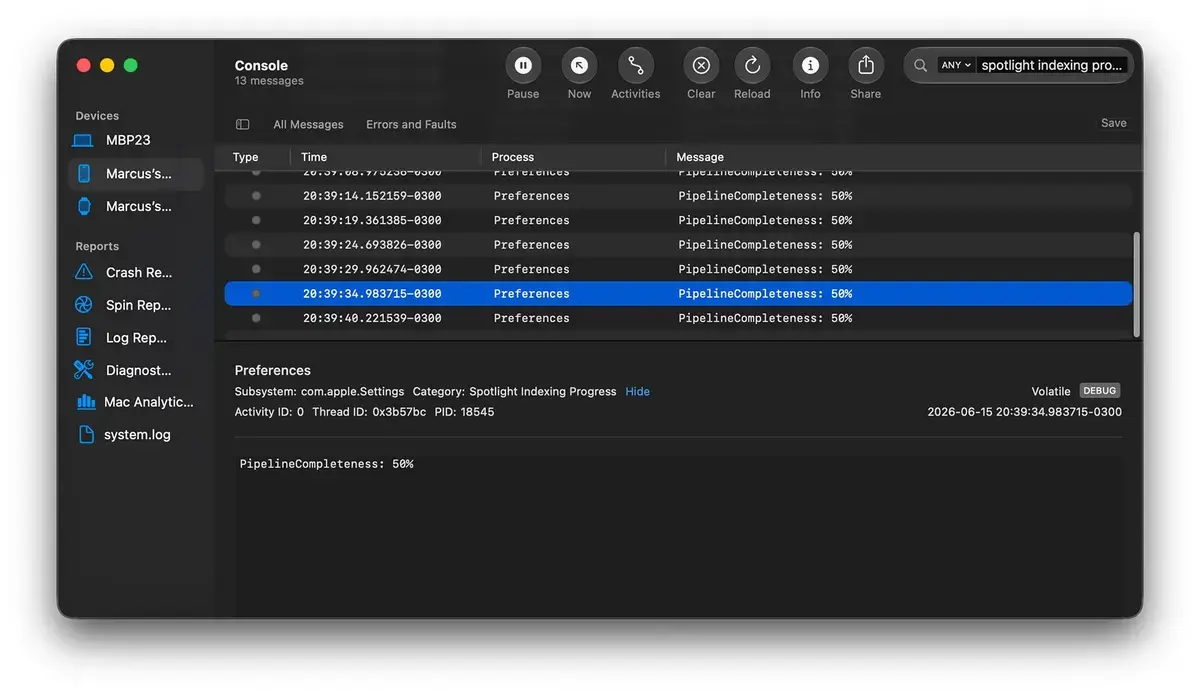
Which Factors Influence the Indexing Duration
The total time required for this process varies significantly between users based on personal usage patterns. Factors such as the number of stored files, the size of your photo library, and the complexity of application databases directly impact how long the system takes to complete its tasks. Apple engineers emphasize that the indexing process is prioritized when the device is idle and connected to power.
Leaving your iPhone plugged into a charger overnight significantly accelerates the system’s ability to complete background indexing tasks.
How You Can Interpret the System Progress Data
Once you have configured the Console app to display the relevant data, you should look for a specific entry labeled ‘PipelineCompleteness: XX%’. This percentage indicates how much of your local content has been successfully indexed for the new Apple Intelligence infrastructure. If you observe this number steadily increasing, you can be confident that your device is functioning normally. This technical insight allows users to verify that their device is actively working toward better search performance and AI integration without having to guess the remaining time.
Have you encountered the indexing notification after installing the iOS 27 beta, and what percentage of progress have you seen on your device? Share your experience in the comments section below to help other users understand how their devices are handling this update.
Your comment has been submitted,
it will be published after approval.