
WhatsApp has officially begun rolling out a new profile tab for iOS users. Following several weeks of beta testing, this update brings a significant change to the user interface. The familiar “Settings” tab in the bottom right corner has been transformed into a new tab named “You.” This new section provides access to a completely redesigned profile settings page.
Good News for iOS WhatsApp Users: First Step Toward Multi-Account Support
With this update, instead of the classic gear icon for settings, you will now see your own profile picture as the tab icon. This change is reaching users via App Store build number 16.5.10.73. Meta’s long-tested innovation aims to make managing your identity and account easier while serving as the foundational step for multi-account support. Much like on Instagram and Threads, it will now be much simpler to see which account is active at a glance.
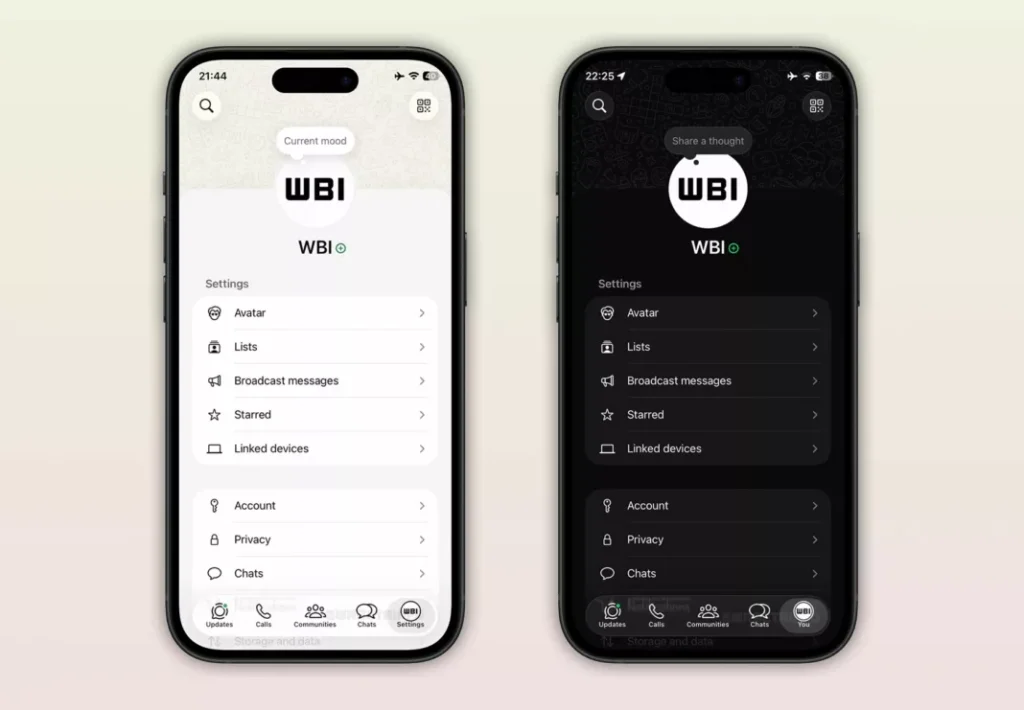
The update also introduces a default cover photo that spans the top of the profile page. While this feature enhances the overall aesthetic of the profile, it is currently available to a limited group of users. Additionally, users are not yet permitted to replace this cover photo with a personal image; the ability to upload custom cover photos is expected to arrive in future updates.
Patience Required for Global Rollout
As with every WhatsApp update, it may take some time for the new “You” tab and cover photo features to reach all users globally. Considering that some elements of the Liquid Glass interface introduced last October are still rolling out to certain devices, patience is advised.
What do you think about these design changes in the app? How will the new profile tab and upcoming multi-account support affect your daily usage? Share your thoughts in the comments!