
Opera One Introduces Vertical Tabs to Simplify Browser Management

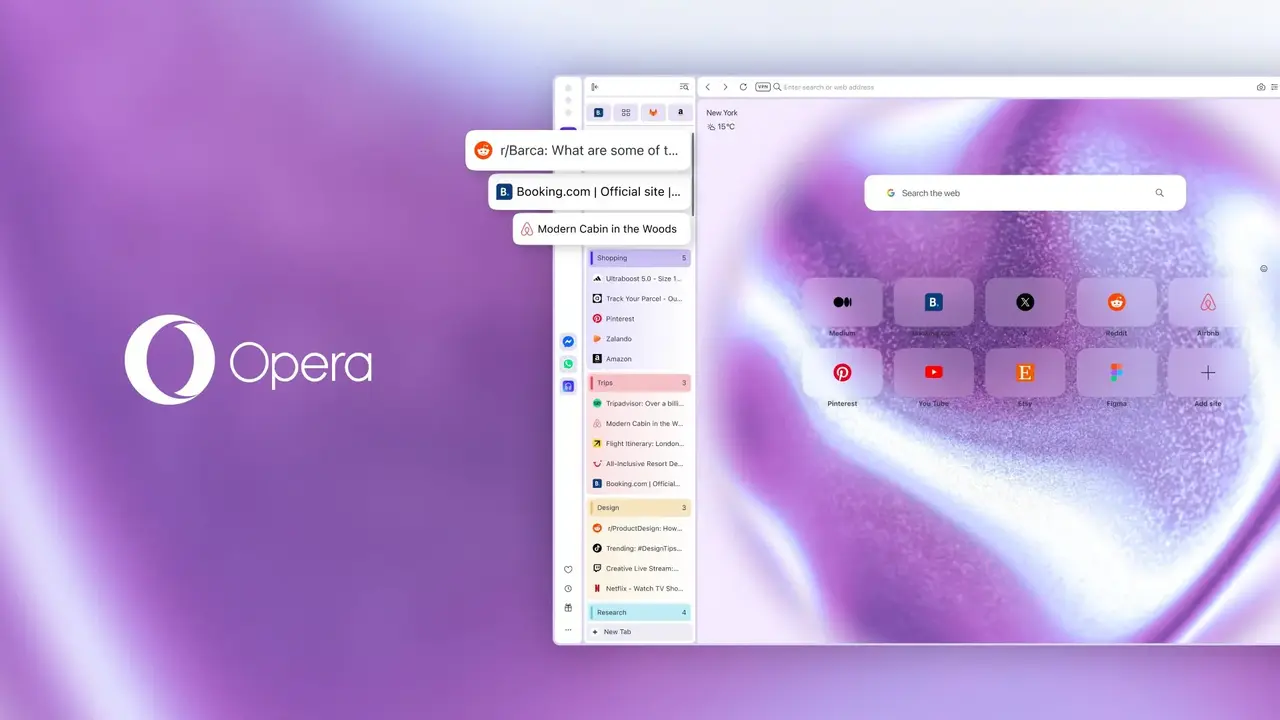
Opera has officially rolled out a significant update for its flagship desktop browser, Opera One, introducing a highly anticipated Vertical Tabs feature designed to optimize workflow for heavy users. This update, released to enhance browsing efficiency, allows users to shift from traditional horizontal layouts to a side-panel view, effectively eliminating tab clutter. In addition to this interface overhaul, the browser has integrated Google Lens directly into the start page search bar, streamlining the visual search process. These strategic improvements reflect Opera’s ongoing commitment to user productivity by providing more organizational control over complex, multi-tab browsing environments.
- The new Vertical Tabs feature allows users to reclaim horizontal screen space by moving open pages to a side panel.
- Opera One maintains full compatibility with the existing Tab Islands architecture within the new vertical layout.
- Google Lens integration now enables users to perform visual searches directly from the browser’s start page.
- Users can activate the vertical interface through multiple methods including the Easy Setup menu and settings page.
Vertical Tabs Address Common Browser Clutter
Modern internet usage often involves managing dozens of tabs simultaneously, which frequently renders horizontal tab bars ineffective. As the number of open pages increases, titles vanish and users are left with nothing but tiny, unrecognizable icons. This common issue creates significant cognitive load and slows down navigation.
The introduction of a vertical interface allows users to view full page titles clearly at a glance.
Opera One’s new vertical panel is fully adjustable, allowing users to expand it for better readability or collapse it into a minimal icon-only view. Pinned tabs remain accessible in a dedicated, organized grid at the top of the panel, ensuring that essential tools remain within reach without sacrificing precious display area.
Tab Islands Functionality Remains Fully Integrated
A notable strength of this update is the seamless preservation of the Tab Islands feature. Even after transitioning to the vertical layout, the browser continues to automatically group related content into cohesive clusters. This ensures that users do not lose their established organizational structure when switching between horizontal and vertical modes. The architectural integrity of these groups remains intact throughout the transition process, providing a consistent experience for users who rely on complex tab management.
Users Can Activate Vertical Tabs Through Multiple Methods
Transitioning to the new layout is designed to be intuitive and accessible. There are three primary ways to toggle this feature depending on user preference. First, users can right-click any open tab and select the option to switch to the vertical strip. Second, the Easy Setup menu in the top right corner of the browser offers a quick toggle under the Layout category. Finally, power users can navigate directly to the browser settings via the address bar to manage tab behavior configurations.
Google Lens Streamlines Visual Searches
The update also enhances visual search capabilities by integrating Google Lens into the start page. By clicking the lens icon in the search bar, users can now drag and drop images, paste copied pictures from their clipboard, or provide direct image URLs. Search results are displayed efficiently without requiring the user to open a new window, keeping the browsing flow uninterrupted. This integration simplifies the process of identifying products, translating text, or finding similar visuals across the web.
We are curious to hear your thoughts on these new design changes; do you find the vertical layout more efficient than the traditional top-bar approach for your daily tasks? Please share your feedback in the comments section below.
Your comment has been submitted,
it will be published after approval.