Google has unveiled a new data import tool designed to lower the barrier for users of rival AI services like ChatGPT or Claude. Users can now export their chat histories and memory data to easily upload them into their Gemini accounts. This ensures that those looking to switch platforms won’t have to start from scratch.
Google’s New Memory Transfer Feature for Gemini
In the AI race, ChatGPT has maintained a user retention advantage by being the first mover. Even as competitors caught up in benchmarks and features, users often stayed to avoid losing their extensive chat histories. Google’s official tool, which was spotted in development earlier this week, was officially announced today in a blog post for all individual Gemini users.
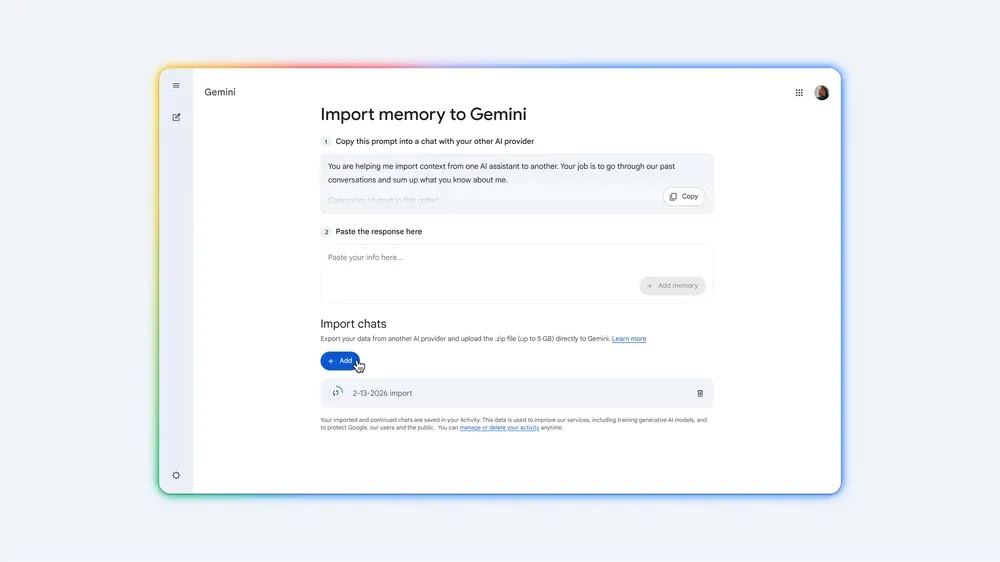
The new tool does not establish a direct API link with other bots. Instead, users must manually export their data and then upload it to Gemini. This feature can be accessed via the “Settings and Help” menu under the “Transfer Memory to Gemini” option.
How to Migrate Memory and Chat History
To transfer memory insights, you can prompt your current AI bot to list its saved “memory” or “custom instructions” in detail. You then copy that response and paste it into the designated field in the Gemini app, clicking the “Add Memory” button. Gemini will then confirm in a new chat window that the data has been saved to your Google Account for future recall.
In tandem with this update, Google announced it is renaming the “Past Chats” feature to “Memory.” This new branding represents the convergence of chat history and long-term context, rolling out to all users over the next few weeks.
For those wanting to move their entire chat archive, the platform allows for the upload of a ZIP file up to 5 GB in size. For instance, to migrate from ChatGPT, you can follow the “Settings > Data Controls > Export Data” steps and simply upload the resulting file to Gemini.
With this new feature launching today, the fear of losing years of personalized AI context is effectively over. Which AI tool are you currently using, and would this migration tool convince you to make the switch to Gemini? Share your thoughts in the comments!
Would you like me to research the privacy encryption Google uses for imported ZIP files or provide the specific prompt template to get the cleanest memory export from ChatGPT? Let me know!