
What Is Instagram Quiet Mode and How to Disable It


Instagram has introduced a digital wellness feature known as Quiet Mode, designed to assist users in managing their social media consumption and reducing digital distractions during essential tasks. Available to all users globally, this tool allows individuals to silence notifications and set boundaries by automatically notifying followers that they are currently unavailable. By implementing this feature, users can effectively detach from the constant influx of reels and alerts, fostering a healthier balance between their online presence and real-life responsibilities. Whether you are focusing on academic studies, professional work, or seeking rest, this built-in utility provides a structured approach to minimizing screen time without requiring you to deactivate your account entirely.
- Quiet Mode automatically silences all incoming Instagram notifications during a user-defined time period.
- The feature displays an indicator on the user’s profile to inform followers that the account is currently in a restricted state.
- Users maintain full access to their accounts while the mode is active, as it does not delete or freeze personal profiles.
- The setting remains customizable, allowing users to toggle it off or adjust the specific schedule through the application’s notification settings.
Taking control of your digital environment is essential for maintaining productivity and mental clarity in the era of constant connectivity.
What Purpose Does Quiet Mode Serve
The primary objective of Quiet Mode is to mitigate the addictive nature of social media engagement. In a landscape dominated by endless video feeds and rapid-fire notifications, it is easy for users to lose track of time. This feature serves as a digital boundary, ensuring that users are not interrupted by non-urgent alerts during deep work or sleep cycles. 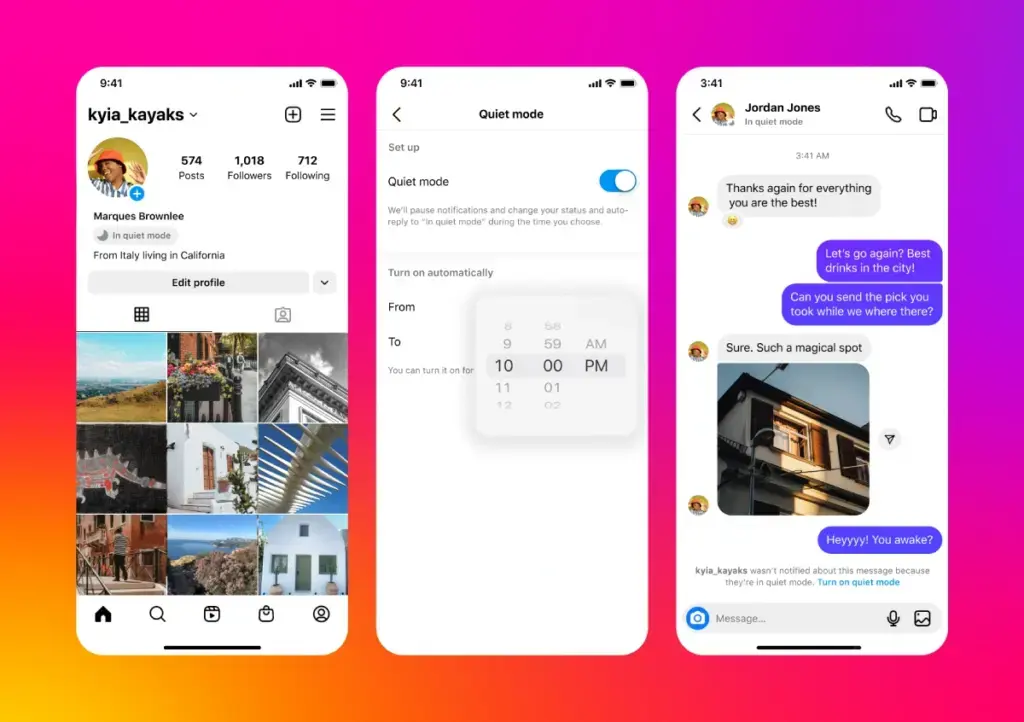 Unlike temporary account deactivation or logging out, this feature keeps your presence active but signals to others that you are currently unavailable to respond, thus managing social expectations during your off-hours.
How Users Can Enable Quiet Mode
Configuring Quiet Mode is a straightforward process integrated directly into the platform’s settings. To activate the feature, navigate to your profile page and access the main menu located in the top right corner. From there, select the notifications tab where you will find the option for Quiet Mode. Once enabled, you can designate the specific hours during which you wish to remain undisturbed. The system will then automatically trigger the silent state according to your personal schedule, ensuring that your digital footprint remains managed without manual intervention.
Customizing your notification schedule helps in creating a sustainable relationship with mobile applications.
How Users Can Disable Quiet Mode
If your circumstances change or you decide to revert your notification settings to their default state, disabling Quiet Mode is equally simple. Access the notification settings within your Instagram profile menu to locate the feature. From this interface, you can either adjust the active hours to better suit your current needs or toggle the switch to the off position entirely. Once disabled, your notifications will resume their standard delivery, and the status indicator will be removed from your profile, notifying your followers that you are back to your regular online status.
Have you utilized Instagram’s Quiet Mode to improve your focus, or do you prefer manual notification management? Share your experiences and thoughts in the comments section below.
Your comment has been submitted,
it will be published after approval.