
WhatsApp Android Debuts Dynamic Navigation Bar for Better UX


WhatsApp is introducing a new dynamic bottom navigation bar feature for its Android application, aiming to significantly enhance the user experience. This innovative functionality, recently discovered in the app’s latest beta versions, allows the navigation bar to dynamically change its size and appearance in response to user scrolling movements. The primary goal is to provide users with more screen real estate, especially when navigating through extensive chat lists. While currently in its development phase and not yet accessible to general beta testers, this dynamic WhatsApp Android navigation bar is poised to modernize the application’s interface, offering a more focused and intuitive interaction for millions of users worldwide.
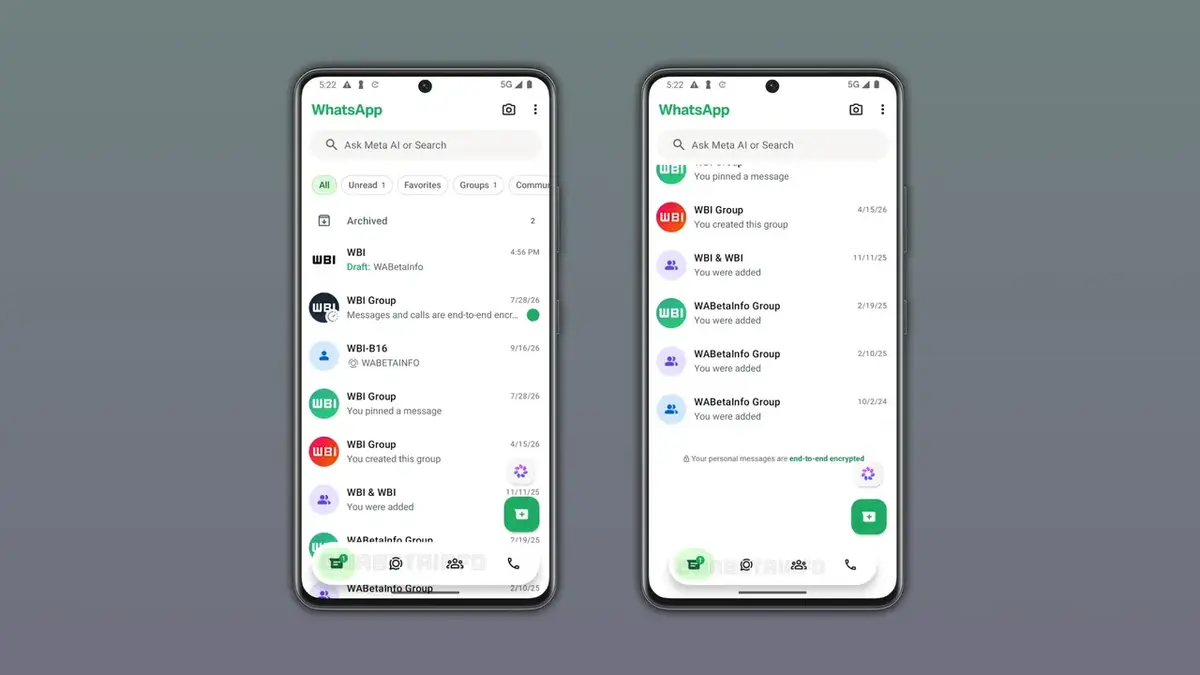
- WhatsApp is developing a dynamic bottom navigation bar that adjusts its size based on scrolling direction.
- The new feature transforms the bar into a compact capsule form as users scroll down their chat list.
- The design of this dynamic navigation bar draws inspiration from a similar user experience found in the Instagram application.
- This functionality is presently under development and has not yet been rolled out to general beta testers.
WhatsApp Continues to Make Its Interface More Dynamic
The popular messaging application WhatsApp consistently implements interface design updates to improve the user experience on the Android platform. After several recent enhancements to its bottom navigation bar, the company is now focusing on a new mechanism that responds directly to user scrolling behavior. This feature specifically aims to prevent elements at the bottom of the screen from obstructing the view when users are searching through chats or scrolling down their message feed, ensuring a smoother and less cluttered visual experience.
Compact Design Significantly Enhances User Experience
The dynamic bottom navigation bar initially appears in its standard full-width form when the user first opens the application. However, as soon as the user begins to scroll down the list, the bar intelligently shrinks in both width and height, transforming into a floating, compact capsule. This streamlined design ensures that essential navigation elements remain accessible while dedicating a larger portion of the screen to chat messages and content. When users scroll back to the top of the list, the bar automatically reverts to its original, expanded state, providing a seamless and intuitive flow.
Similar Design Approach Is Being Shared with Instagram
A consistent design language continues to be a hallmark among applications under the Meta umbrella. Instagram users are already familiar with a similar user interface element where the bottom navigation bar gracefully hides as they scroll down their content feed. WhatsApp is now integrating this fluid and space-saving interface structure into its own ecosystem. The company aims to create a consistent user experience by incorporating design patterns that users are accustomed to from other popular applications, thereby fostering familiarity and ease of use across its platforms.
Design Processes Are Still Being Actively Developed
WhatsApp’s work on the bottom navigation bar extends beyond just this dynamic resizing feature. Previously, the company removed tab labels and updated tab indicators, and it is now adding this scrolling behavior to further refine the design. It is important to note, however, that the interface is not yet finalized, and additional design changes or refinements may be introduced in future beta updates as the development process continues to evolve. The company is committed to delivering a polished and user-friendly experience.
New Feature Is Expected to Be Introduced in Upcoming Updates
The aforementioned dynamic navigation bar is currently in an active development phase and has not yet been incorporated into the public beta program. WhatsApp plans to make this feature available to a select group of beta testers once development is complete. While an official release date has not yet been confirmed, this update is widely anticipated to be a highly efficient and beneficial enhancement for Android users, promising a more modern and responsive application experience.
Do you believe these dynamic changes to WhatsApp’s interface make the user experience more comfortable, or do you prefer the traditional fixed bar structure? Share your thoughts and expectations for this new feature in the comments section below.
Your comment has been submitted,
it will be published after approval.