
WhatsApp Rolls Out Redesigned Message Menu for Android Users

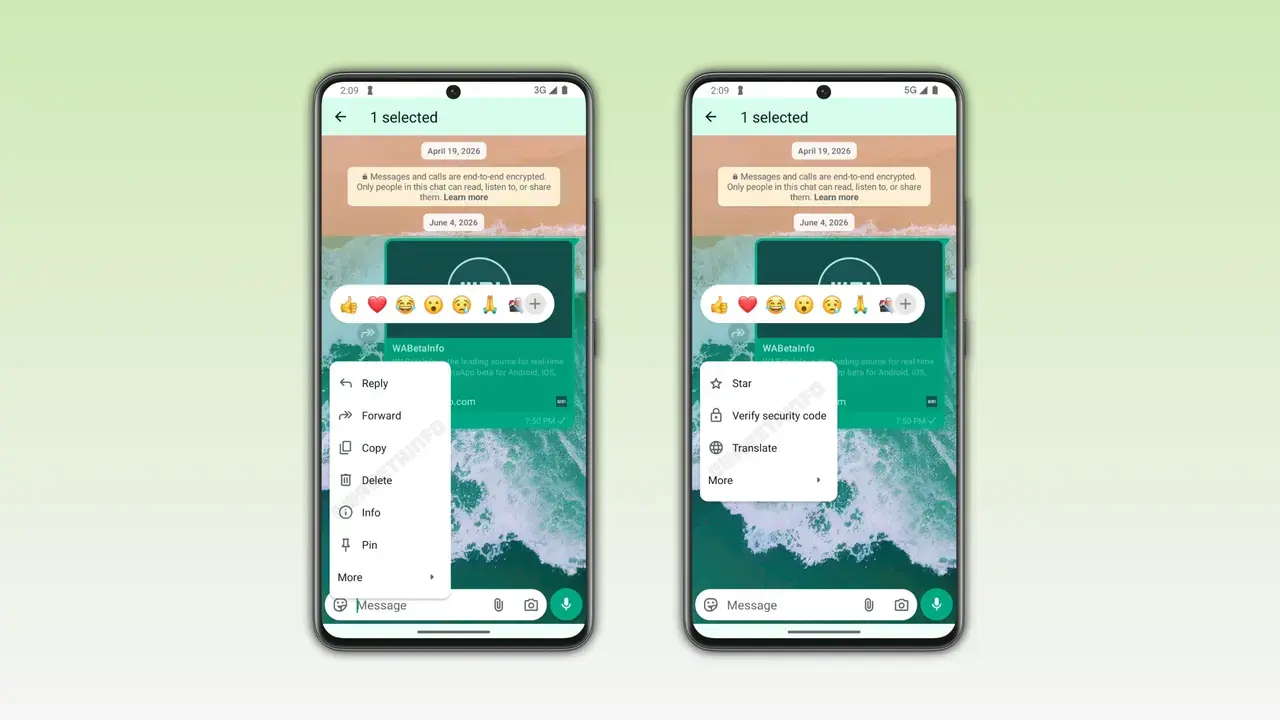
WhatsApp has officially commenced the rollout of a long-awaited, redesigned message menu for Android users, marking a significant shift in the application’s interface. Introduced in the WhatsApp beta for Android version 2.26.23.8, this update modernizes the interaction model by replacing the traditional top-bar navigation with a more intuitive, context-aware menu. After three years of development, this update brings the Android experience closer to the iOS interface, allowing users to manage messages directly through a floating menu that appears upon long-pressing a conversation bubble. This update aims to streamline communication and reduce the friction associated with standard message management tasks.
- WhatsApp is introducing a redesigned message menu on Android to improve user interaction efficiency.
- The new feature utilizes a floating menu structure that appears directly next to the selected message.
- The update is currently available to a limited number of beta testers before a wider release occurs.
Message Management Tasks Become More Streamlined
Previously, Android users were required to look toward the top of their screens to access message management functions whenever they selected a text. This design often disrupted the flow of conversation, forcing users to divert their attention away from the content itself. The new implementation addresses this by clustering all primary actions, such as reply, forward, and delete, within a compact menu located right next to the active message. Less frequent actions are neatly categorized under a ‘More’ section, maintaining a clean and minimalist aesthetic while providing quick access to essential tools.
Users no longer need to navigate to the top of the screen to manage individual messages.
New Design Aligns with iOS Interaction Standards
The primary motivation behind this design overhaul is to ensure a cohesive experience across different operating systems. Although Android and iOS utilize distinct design languages, Meta is increasingly aligning the interaction patterns on both platforms. This strategy assists users who switch between devices, as they can rely on a consistent interface logic for their daily messaging needs. By bringing this functionality to Android, WhatsApp ensures that its core features remain predictable and user-friendly regardless of the hardware platform.
Beta Testing Remains Restricted to Select Users
At the current stage, the redesigned menu is exclusively available to participants of the official WhatsApp beta program on the Google Play Store. While the company has not provided a definitive date for a global stable release, the acceleration of development suggests that a broader rollout is imminent. Analysts expect the feature to reach all Android users in the coming weeks as developers finalize the stability and performance of the interface. This deployment represents a major milestone in the platform’s ongoing efforts to refine its Android client.
The three-year development cycle finally delivers a modern interface to the Android ecosystem.
Development Cycle Meets User Expectations
First teased in 2023, the interface change has been met with significant anticipation from the global community. Android users have consistently requested that the functional and aesthetic benefits found on the iOS version be ported to their devices to enhance daily productivity. Following a lengthy testing and iteration phase, the feature is finally becoming a permanent component of the Android ecosystem, signaling a commitment from WhatsApp to listen to community feedback and modernize its legacy interface elements.
How do you feel about this new message menu design arriving on Android? Do you believe having an iOS-like experience will speed up your daily messaging, or do you prefer the classic layout? Share your thoughts and personal experiences in the comments section below.
Your comment has been submitted,
it will be published after approval.