
WhatsApp Tests Media Previews in Chat Lists for Android

WhatsApp has officially begun testing a significant update for its Android platform that introduces media previews directly into the chat list interface. Spotted in the latest beta version 2.26.32.11, this development allows users to view thumbnail versions of photos, videos, and stickers without needing to open individual conversations. By integrating these visual elements into the main menu, the messaging giant aims to improve user efficiency, enabling people to identify the context of incoming messages instantly. While the feature is currently accessible to a limited group of beta testers, it is expected to roll out to a broader user base in the coming weeks.
- WhatsApp is testing media previews for photos, videos, and stickers in the Android chat list.
- The feature is currently available within the 2.26.32.11 beta version of the application.
- Users can view message content without accessing the specific chat window.
- The rollout for the general public will occur through gradual updates in the near future.
Chat Lists Become More Functional With Visuals
The messaging platform is constantly refining its interface to ensure that users manage their communication more effectively. Following the recent introduction of draft message indicators, the integration of media previews marks another step toward a more intuitive user experience. Previously, users were greeted with simple text labels like “Photo” or “Video” in their notification lists. Now, these labels are accompanied by small, high-quality thumbnails that provide immediate context regarding the shared content. 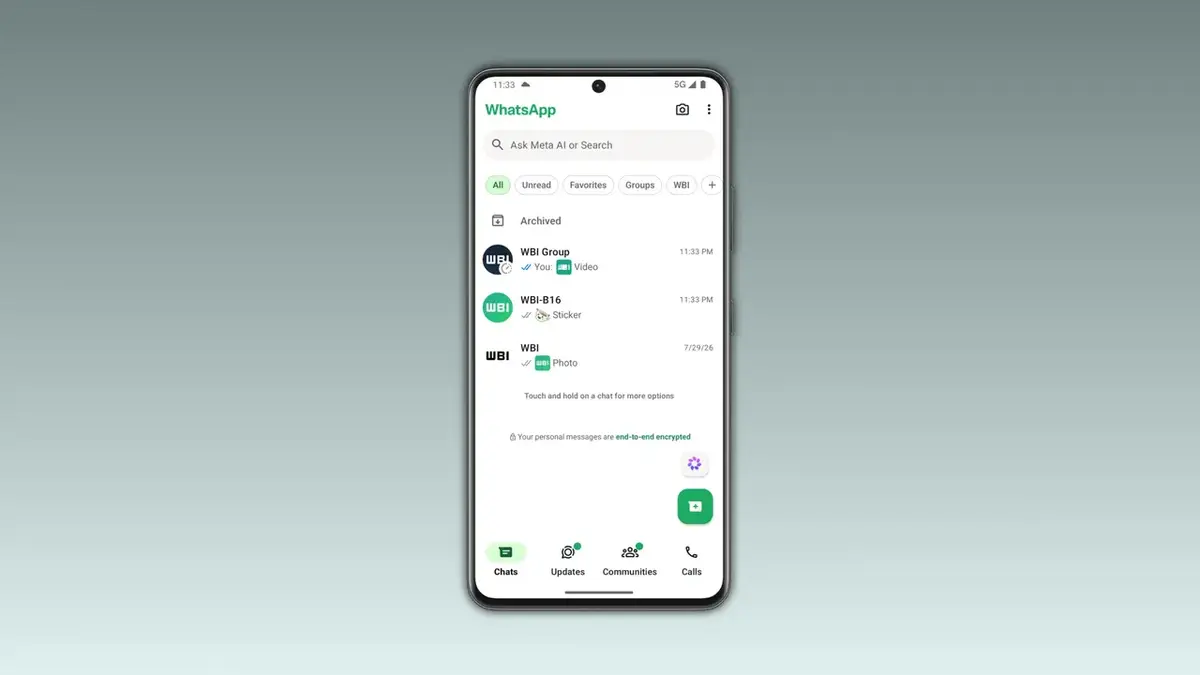
Users can now perceive the nature and urgency of incoming media directly from the primary chat overview.
Media Previews Increase User Efficiency
These thumbnail previews are expertly designed to blend seamlessly into the existing layout of the WhatsApp interface. By maintaining a compact size, the images do not clutter the screen or disrupt the user’s workflow. This functionality proves particularly advantageous for individuals who participate in numerous active groups. Instead of clicking into a conversation to determine whether a shared file requires an immediate response, users can make an informed decision based on the visual preview. This design choice effectively saves time and reduces unnecessary navigation across the application.
Stickers Receive Enhanced Preview Support
The update extends beyond standard media files by including support for stickers as well. Custom stickers sent by contacts or within groups will now appear in a small box within the chat list view. This allows users to enjoy and recognize the creative content sent by their peers without leaving the main dashboard. The update ensures that the “Sticker” label remains visible alongside the image, providing clear information while allowing the visual element to take center stage in the chat notification.
The Update Rolls Out Gradually
As of now, this feature remains exclusive to users enrolled in the Google Play Store beta program. WhatsApp traditionally follows a phased distribution strategy for major interface changes to ensure stability across diverse Android devices. Those currently enrolled in the beta testing program should keep their applications updated to receive the feature as it becomes available. While the company has not yet confirmed an official date for the global launch, the successful testing phase suggests that a stable release is likely on the horizon for all users worldwide.
Do you believe that seeing media previews directly in your chat list will simplify your daily WhatsApp interactions? Share your thoughts and expectations regarding this new feature in the comments section below.
Your comment has been submitted,
it will be published after approval.