
WhatsApp Updates About Section and Enhances User Privacy Features


WhatsApp has officially rolled out a significant update to its Android application, specifically targeting the ‘About’ section to provide users with more granular control over their profile management. With the beta version 2.26.24.1, the Meta-owned messaging giant has completely redesigned how users present themselves to their contacts. This update, introduced globally this week, allows Android users to modify their visibility settings directly within the profile management screen, eliminating the need to navigate through deep privacy menus. By streamlining these controls, WhatsApp aims to ensure that managing personal information remains both intuitive and highly transparent for its millions of daily active users.
- The redesigned ‘About’ section allows users to adjust privacy settings directly from their profile screen.
- WhatsApp Web now supports group voice and video calls for up to 32 participants with end-to-end encryption.
- A new ‘view once’ option for text messages is currently undergoing testing to increase digital privacy.
- Android users will soon gain access to a dedicated home screen widget for recording voice notes.
Privacy controls are now seamlessly integrated into the profile management interface to accelerate user workflows.
WhatsApp Web Supports Group Calls Now
The platform continues to bridge the gap between mobile and desktop experiences by expanding the capabilities of WhatsApp Web. Users can now conduct browser-based group voice and video calls without reaching for their smartphones. This feature supports up to 32 participants simultaneously, all protected by the platform’s signature end-to-end encryption. 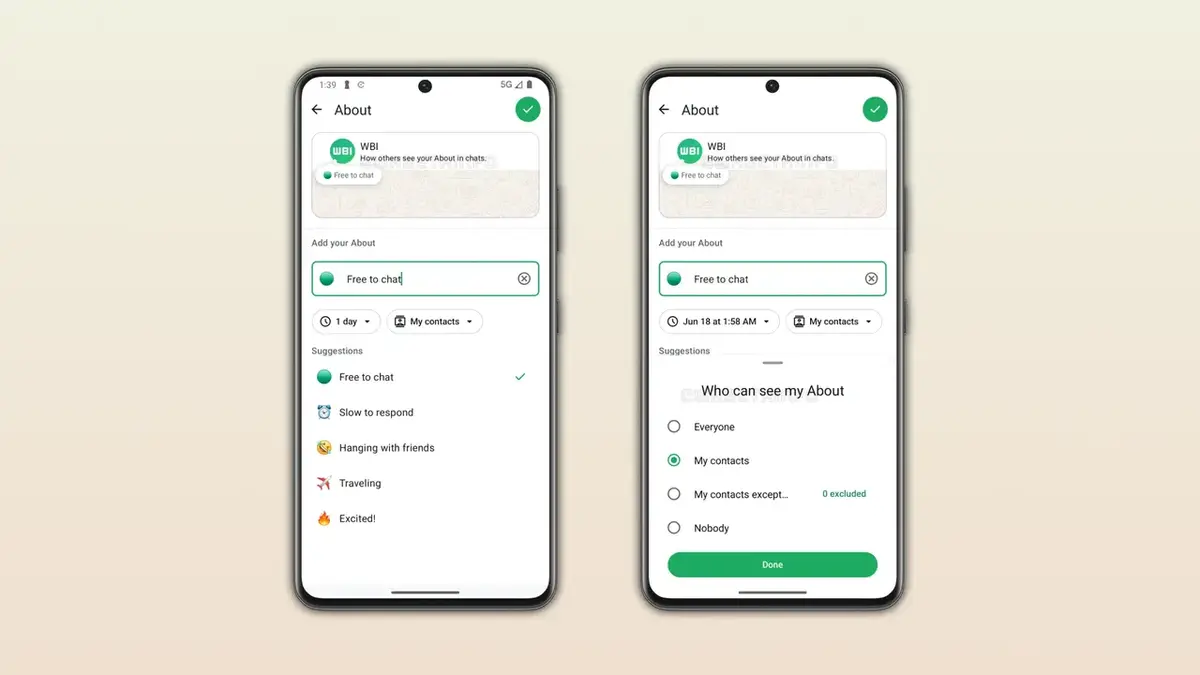 Furthermore, the introduction of screen sharing during these calls, combined with simplified secure join links, significantly improves collaborative efforts and meeting efficiency for professional and personal users alike.
Message Privacy Features Are Increasing
In a move to further secure individual communications, WhatsApp is testing a ‘view once’ feature for standard text messages in its latest iOS beta. Once the recipient reads the text, the message is automatically purged from the conversation, preventing any unauthorized copying or forwarding of sensitive information. This development reinforces the company’s commitment to data protection in an era of increasing digital scrutiny.
The implementation of self-destructing text messages elevates the standard for private digital communication.
Voice Note Widget Is Being Developed for Android
To address the need for faster interaction, the development team is currently working on an Android home screen widget dedicated to voice notes. This tool will allow users to initiate recordings instantly without needing to open the main application, effectively reducing the friction involved in capturing fleeting thoughts or urgent messages. This feature remains in the early testing phase but reflects a broader strategy to prioritize speed.
Group Information Screen Is Being Reorganized
The group information display on Android devices is undergoing a structural overhaul to improve usability. By utilizing a tabbed navigation system, the app now separates settings into two distinct categories, which helps to declutter the interface for users managing numerous active groups. This systematic approach ensures that essential group management tasks are performed with greater precision and less navigational confusion.
Online Status Uses a Green Dot
WhatsApp is modernizing its interface by replacing text-based labels with a sleek green dot icon to denote online status. Initially visible only within specific chat info screens, this visual cue will eventually be implemented across the entire application to align with modern design standards found in competing messaging platforms. This subtle change provides a cleaner look while maintaining the functionality users expect.
We are curious about your thoughts regarding these new design updates and privacy-focused features. Please share your experiences in the comments section below and let us know which specific feature has most significantly improved your daily workflow.
Your comment has been submitted,
it will be published after approval.