
How to Install NVIDIA DLSS 5 on Any PC Game

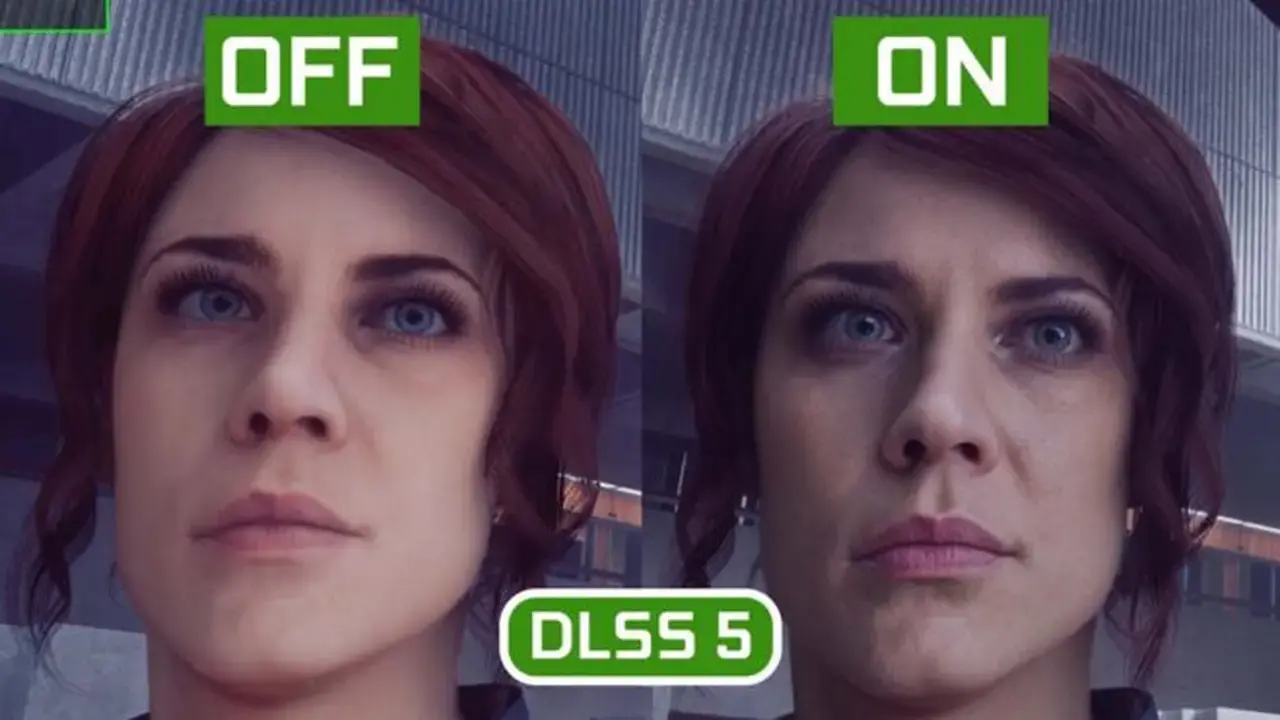
NVIDIA’s cutting-edge neural rendering technology, DLSS 5, is officially reshaping visual fidelity for PC gamers, and enthusiasts can now experience its benefits across a vast library of titles. Through leaked early-access files and community-developed tools, users are successfully integrating DLSS 5 into both modern DirectX 12 games and legacy titles running on DirectX 9, 11, or Vulkan APIs. This technical breakthrough allows players to bypass the lack of native support by leveraging sophisticated modding utilities to enable AI-driven upscaling. As the gaming community tests these tools, the potential for enhanced image quality across decades of software is becoming increasingly evident for hardware enthusiasts worldwide.
- The DLSS 5 Swapper utility streamlines the integration process for modern DirectX 12 games by automating library updates and file backups.
- The DLSS 5 Feeder mod enables neural rendering in legacy titles by generating synthetic motion vectors and depth buffers.
- Current implementations rely on leaked early-build files that may lack the optimization of future official NVIDIA software releases.
DLSS 5 Swapper Simplifies Installations for Modern Games
Modern titles designed for DirectX 12 are architecturally compatible with the latest neural processing standards. To simplify the implementation process, developers have introduced the DLSS 5 Swapper tool. This application eliminates the need for manual file manipulation, which often leads to errors or corrupted game data. By automatically identifying the game directory, the tool replaces legacy libraries with the latest DLSS 5 components while simultaneously deploying necessary ReShade configurations. Furthermore, it creates secure backups of original files, ensuring that users can revert changes if stability issues arise. Once installed, players simply access the ReShade menu via the ‘Home’ key to verify that the neural rendering plugin is successfully active.
DLSS 5 Feeder Bridges the Gap for Legacy Titles
Integrating advanced upscaling into older software presents significant challenges because DirectX 9, 11, and Vulkan titles lack the native code blocks required for DLSS communication. The DLSS 5 Feeder mod effectively functions as a middleware bridge to overcome these technical limitations. By intercepting raw data such as frame timing, depth maps, and motion vectors through the ReShade layer, the mod creates a simulated chain of commands that the DLSS engine can interpret as a native request. Although this process requires more manual configuration than the Swapper utility, it provides a substantial visual upgrade for classic games like GTA 4 or the original Red Dead Redemption.
Early Builds Require Cautious Performance Expectations
It is critical for users to understand that the current methods for enabling this technology depend on leaked, unoptimized software builds. While the results demonstrate impressive potential for neural image reconstruction, players may encounter visual artifacts, inconsistent frame rates, or stability issues that would not be present in an official, native integration from NVIDIA. These community-led efforts serve as an experimental preview rather than a final product. As the industry anticipates official updates, these tools remain a powerful way to test the theoretical limits of hardware and software synergy in both modern and retro gaming environments.
Have you tried testing DLSS 5 on your favorite classic titles, or do you prefer waiting for official developer support? Share your experiences with frame rates and visual fidelity in the comments section below.
Your comment has been submitted,
it will be published after approval.