
Universal MFG Unlocker 1.6.1 Enables Real-Time DLSS Preset Switching

Mod developer dashdogy has officially released Universal MFG Unlocker 1.6.1, a significant update that introduces real-time DLSS preset switching for NVIDIA GeForce RTX 20, 30, 40, and 50 series graphics cards. Available now for the enthusiast community, this software bridges the gap between hardware generations by allowing users to modify DLSS settings on the fly without restarting DirectX 12 games. By providing granular control over advanced NVIDIA technologies, the tool empowers gamers and content creators to optimize visual fidelity and frame rates instantly, effectively democratizing features that were previously restricted to specific hardware tiers or required complex manual configurations within the official NVIDIA app. 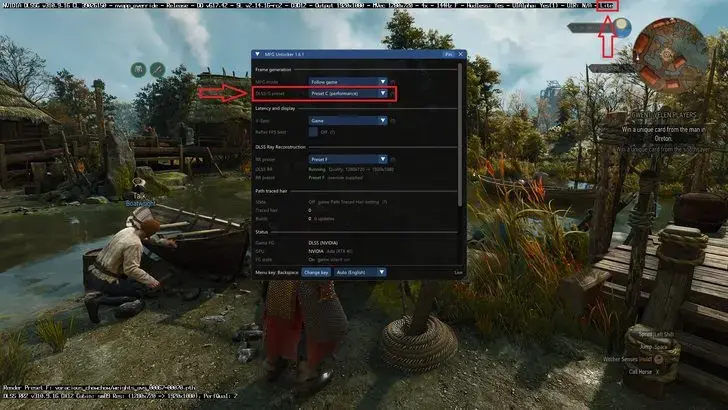
- The 1.6.1 update enables real-time adjustment of DLSS presets across all modern NVIDIA RTX series GPUs.
- DirectX 12 titles now support instant modification of Super Resolution and Frame Generation settings without requiring a game restart.
- The software includes dedicated performance monitoring tools and specialized optimizations for the new RTX 50 series hardware.
- Users can access the integrated, non-intrusive menu during gameplay by pressing the Backspace key.
Control Over DLSS Technologies Increases Substantially
Previously, users seeking to fine-tune their DLSS experience were often required to navigate through cumbersome external configuration files or NVIDIA’s official control panels. The Universal MFG Unlocker 1.6.1 removes these barriers by integrating a streamlined overlay directly into the gaming environment. This innovation allows for immediate, toggleable adjustments to Super Resolution profiles—ranging from J to M presets—as well as Ray Reconstruction options and Frame Generation models. 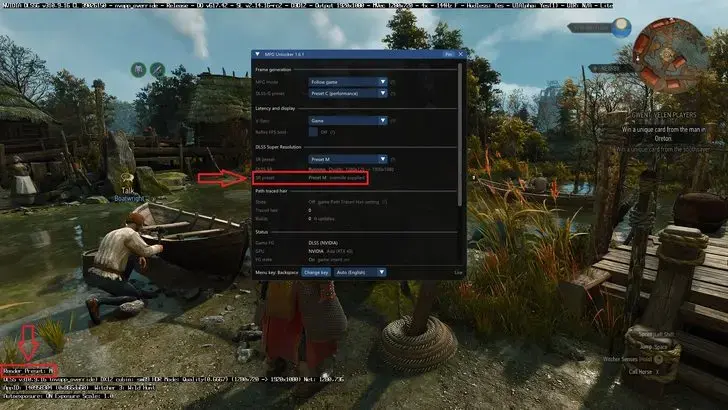 Such flexibility is essential for power users who prioritize the delicate balance between image clarity and maximum performance, particularly in titles where visual artifacts can detract from the immersion.
New Optimization Features Benefit RTX 50 Series Users
In addition to broader compatibility, developer dashdogy has introduced a suite of optimizations specifically tailored for the latest RTX 50 series architecture. This package includes refined Multi Frame Generation (MFG) controls, dynamic scaling configurations, and an advanced Reflex FPS limiter designed to enhance input responsiveness. 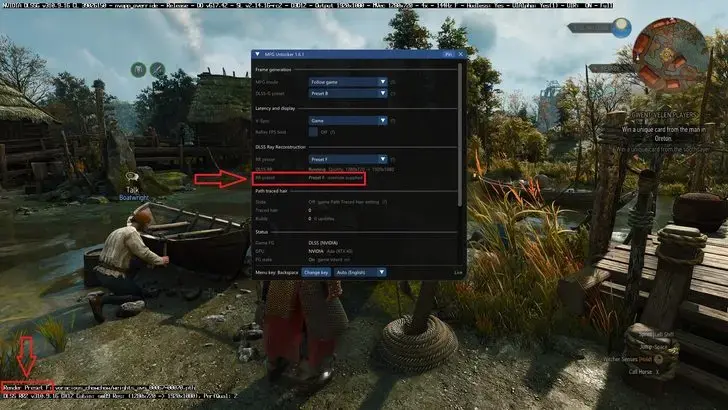 Furthermore, the update successfully addresses stability concerns that hindered previous iterations, particularly regarding Frame Generation errors on older RTX 20 and 30 series cards. The developer has also significantly improved compatibility with XeSS Multi Frame Generation, ensuring that users with diverse hardware setups can benefit from this advanced feature set.
Expert Users Gain a Critical Testing Tool
While the project remains in an experimental phase, it serves as a vital resource for those looking to push their hardware to its limits. By eliminating the time-consuming process of restarting games to apply settings, the mod provides a seamless testing ground for the latest DLSS models. Although Vulkan-based titles still necessitate a restart, the fluidity provided in the DirectX 12 ecosystem demonstrates the potential for future official software iterations. As NVIDIA continues to evolve its upscaling technology, community-driven projects like this remain essential in highlighting the demand for more accessible, user-controlled performance settings within the standard driver suite.
Do you believe NVIDIA should integrate these real-time DLSS preset adjustment features into their official driver updates, or do you prefer the flexibility offered by community-developed mods? Have you tested this new version on your own hardware yet? Share your performance benchmarks and experiences with us in the comments section below.
Your comment has been submitted,
it will be published after approval.