
Gears of War E-Day PC System Requirements Revealed


The Coalition has officially unveiled the highly anticipated Gears of War E-Day system requirements, providing PC gamers with the necessary technical specifications to prepare their hardware for the upcoming title. Studio head Mike Crump confirmed these details as the game reaches its gold status, marking the completion of production ahead of its scheduled release. The published data outlines performance expectations across various hardware configurations, ranging from entry-level setups to high-end enthusiast rigs. By detailing specific CPU, GPU, and memory needs, the developer aims to ensure that players across the entire PC spectrum can effectively optimize their experience for the intense action of this new Gears chapter.
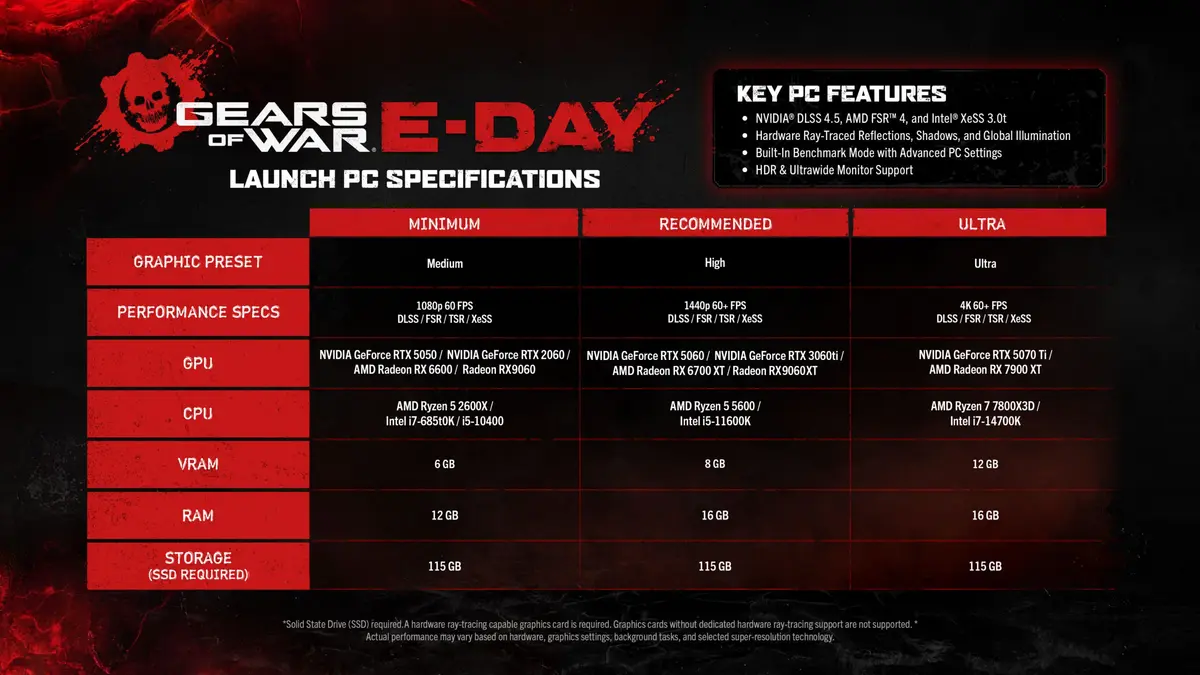
- The game requires a minimum of 115 GB of SSD storage space across all performance tiers.
- Developers have integrated support for advanced scaling technologies including Nvidia DLSS 5, AMD FSR 4, and Intel XeSS 3.0.
- Recommended hardware for 1440p resolution at 60 FPS includes an RTX 3060 Ti or equivalent GPU paired with 16 GB of RAM.
- The title features a built-in benchmarking tool to assist users in calibrating their graphical settings.
Minimum Hardware Targets are Defined for Entry-Level Performance
For those targeting a baseline experience at 1080p resolution and 60 FPS, the requirements remain accessible but demanding by modern standards. Users must equip at least an Nvidia GeForce RTX 2060, RTX 5050, or AMD Radeon RX 6600. Processor-wise, the game necessitates an Intel i5-10400, i7-6850K, or AMD Ryzen 5 2600X. Additionally, players must ensure they have at least 12 GB of RAM available to maintain stable frame rates during gameplay.
Recommended Specifications are Provided for High-Quality Visuals
To achieve the recommended settings of 1440p at 60 FPS or higher, the hardware barrier increases significantly. The studio suggests utilizing an Nvidia GeForce RTX 3060 Ti, RTX 5060, or an AMD Radeon RX 6700 XT. The processor requirements shift to more modern standards, specifically the Intel i5-11600K or AMD Ryzen 5 5600, complemented by 16 GB of system memory. These specifications are designed to deliver the cinematic fidelity that the franchise is known for without compromising on performance fluidity.
Ultra Settings are Recommended for 4K Resolution Enthusiasts
Players striving for the ultimate visual experience, defined as 4K resolution at 60 FPS, will need top-tier components. The recommended GPU list for Ultra settings includes the powerful Nvidia GeForce RTX 5070 Ti or the AMD Radeon RX 7900 XT. To handle the increased computational load, a high-performance CPU such as the Intel i7-14700K or AMD Ryzen 7 7800X3D is strongly advised. Regardless of the chosen graphical preset, the 115 GB SSD storage requirement remains a constant across all user profiles.
Modern Technologies Enhance the Visual Experience
The PC version of Gears of War: E-Day is built to leverage the latest graphical innovations. Beyond standard rendering, the game features robust support for hardware-accelerated ray tracing, which significantly improves the quality of reflections and dynamic shadows. Furthermore, the inclusion of HDR and ultra-wide monitor support ensures that players with premium display setups can fully immerse themselves in the game’s environment. These technical features are intended to provide a scalable experience that adapts to the specific capabilities of a player’s machine.
Now that the official requirements are out, we are curious to hear your thoughts on whether your current PC build is ready for the intense action of E-Day. Does your rig meet the recommended specifications, or are you planning any upgrades before the launch? Let us know in the comments section below.
Your comment has been submitted,
it will be published after approval.