
Gmail Introduces One-Tap Copy Feature for 2FA Codes

Google has officially rolled out a highly anticipated update for its Gmail mobile application on Android and iOS, designed to simplify the login process for millions of users. The new feature introduces a convenient Gmail 2FA code copying shortcut directly within the inbox view, allowing users to extract two-factor authentication codes without the need to open individual emails. By displaying the verification digits in a pill-shaped button beneath the subject line, Google aims to streamline security workflows and reduce the time spent navigating through cluttered inboxes. This functionality is currently available for Android version 2026.09.07.x and iOS version 6.0.260907.
- Gmail now displays a dedicated button to copy two-factor authentication codes directly from the inbox interface.
- The feature minimizes user effort by eliminating the need to open emails manually to view verification digits.
- Current compatibility is limited to the Gmail mobile application for Android and iOS platforms.
- Automated code detection functions seamlessly with emails originating from banking and retail services.
Efficiency in Verification Processes is Being Prioritized
Previously, retrieving a verification code required a multi-step process involving opening the email, locating the specific string of numbers, and manually copying the text to the clipboard. The new update fundamentally changes this interaction model by surfacing the code in a preview format similar to document or image attachments. 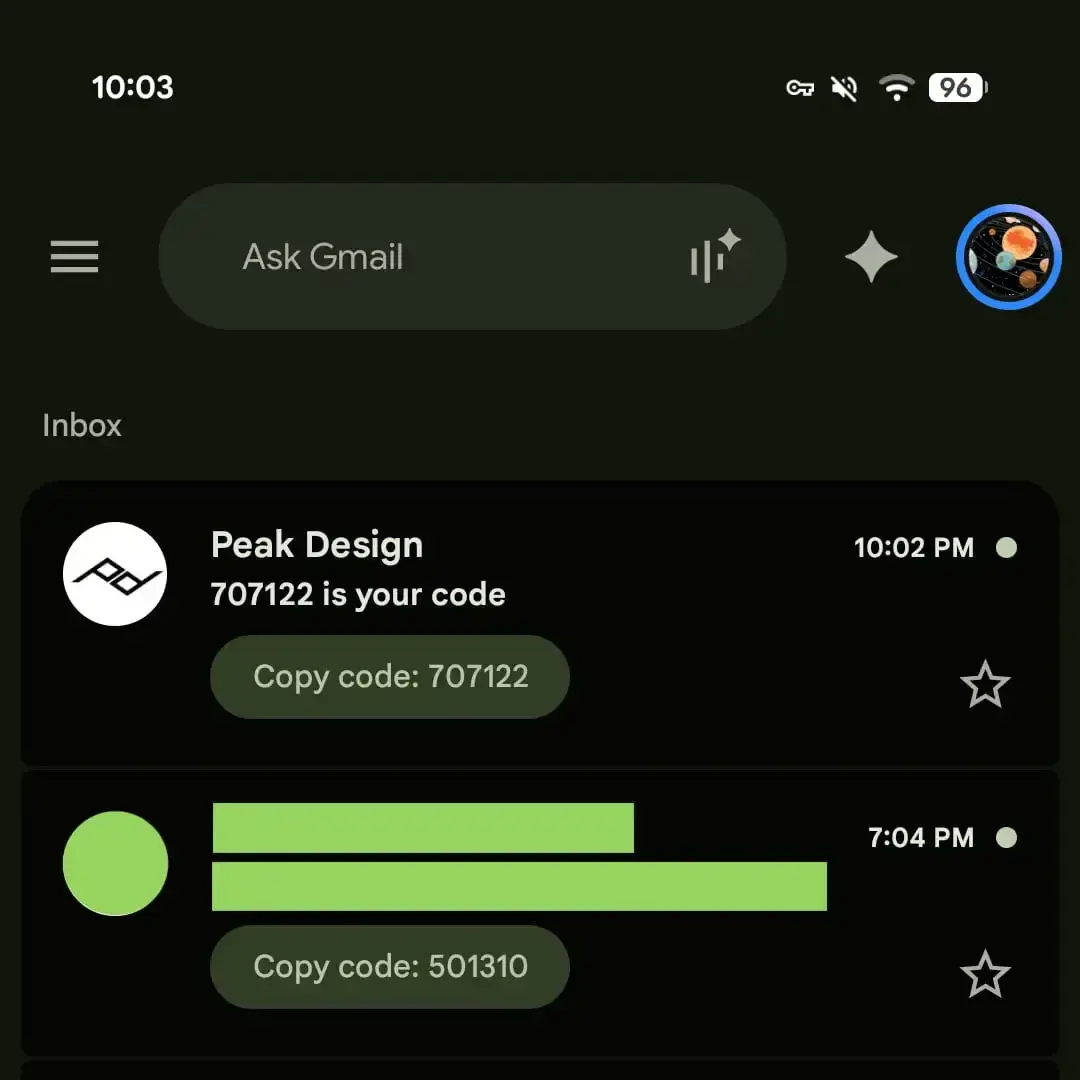
When a user taps the “Copy Code” button, the application automatically triggers the clipboard function, allowing for instant pasting into the target platform. This reduction in friction is particularly beneficial for users frequently logging into high-security services that mandate time-sensitive authentication tokens. By removing the necessity to scan email bodies, the update enhances both speed and user convenience during daily digital tasks.
Platform Availability and Future Updates are Being Evaluated
At present, the functionality is restricted to mobile environments and does not extend to the web-based interface of Gmail. While the integration currently serves as an inbox-level tool, reports suggest that Google is considering expanding the feature to include system-level notifications for Android devices in upcoming releases. This potential enhancement would further eliminate the need to switch applications entirely during the authentication sequence.
The rollout demonstrates Google’s ongoing commitment to refining its Workspace ecosystem through practical, user-centric innovations. Recent additions to the platform, such as advanced search capabilities and integrated chat features, have already set a precedent for improving mobile interactivity. The current 2FA update aligns with the broader strategy of making mobile application usage more intuitive and efficient for professionals and casual users alike.
Security Workflows are Becoming More Accessible
The implementation of this shortcut is a testament to the importance of mobile-first design in modern software development. As digital security protocols continue to rely heavily on secondary verification methods, developers are increasingly tasked with minimizing the negative impact these security measures have on user experience. Google’s latest update effectively strikes a balance between rigorous security standards and the need for rapid, fluid application access.
Early testing confirms that the feature is highly compatible with the standardized formatting used by major banking institutions and e-commerce platforms. This high degree of compatibility ensures that a wide segment of the user base can immediately benefit from the time-saving potential of the update. As the company continues to monitor user feedback, further optimizations to the detection algorithm are expected to ensure even greater reliability for diverse email formats.
Have you had a chance to test this new one-tap copy shortcut in your Gmail app yet, and do you feel it significantly improves your daily login speed? Share your thoughts on this update in the comments section below.
Your comment has been submitted,
it will be published after approval.