
Google Chrome 150 Update Adds Back Button to Android

Google has officially launched the Google Chrome 150 update for Android users worldwide, introducing significant interface adjustments designed to streamline mobile browsing. Available today via the Google Play Store, this update brings a dedicated ‘back’ button directly into the browser’s three-dot menu. By integrating this navigation feature, Google aims to provide a more intuitive experience, allowing users to return to previous pages without relying solely on system-level gestures or physical navigation keys. This major release signifies Google’s ongoing effort to unify the browser experience across mobile and desktop platforms, ensuring that essential navigation tools are consistently available for all users.
- Google Chrome 150 integrates a dedicated back button into the browser’s overflow menu for Android devices.
- The browser interface features a relocated bookmarks button and a new menu item for site controls.
- The “Add to Home Screen” feature has been rebranded as “Install and create shortcut” to emphasize PWA functionality.
- The information button has been completely removed from the browser menu structure.
The revamped interface layout will likely challenge the muscle memory of long-time Chrome users during the initial transition phase.
Chrome Interface Reflects Significant Navigational Changes
The addition of the back button to the Android version brings the mobile experience closer to the standards previously established on iOS. While desktop users have long enjoyed the ability to customize or hide navigation buttons, this mobile update focuses on consistency. By embedding this functionality into the primary menu, Google ensures that users have a reliable fallback option regardless of their device’s specific navigation gestures.
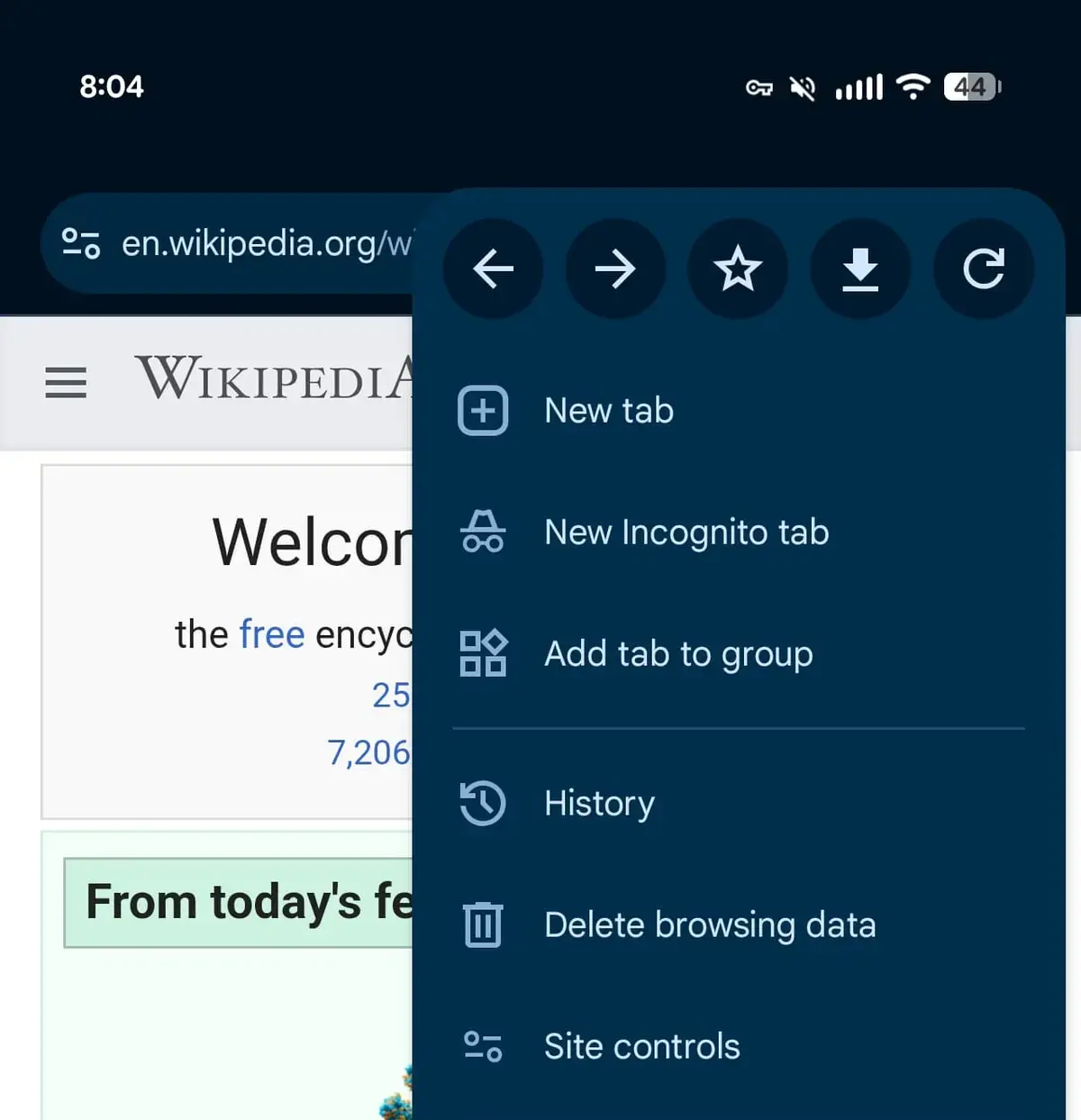
Beyond the back button, the entire menu architecture has undergone a comprehensive reorganization. The traditional information button has been decommissioned, replaced by a more robust “Site Controls” menu item. This shift reflects the browser’s increasing complexity, particularly following the introduction of features like Reading Mode earlier this year, which necessitated a more streamlined approach to managing site-specific permissions and settings.
User Habits Require Necessary Adjustments
Frequent users of Chrome will notice that the layout changes extend to the placement of common icons. The bookmarks and download buttons have been shifted toward the right side of the interface, a change intended to optimize space and accommodate the new menu items. While these adjustments might cause temporary confusion for those accustomed to the previous layout, they represent a broader strategic shift in how the browser handles mobile web content.
Furthermore, the rebranding of the “Add to Home Screen” feature to “Install and create shortcut” highlights Google’s commitment to Progressive Web Apps (PWAs). This nomenclature shift suggests that the company is placing a higher priority on transforming websites into app-like experiences.
These browser updates reflect Google’s broader strategy of evolving the mobile web experience into an application-centric environment.
Update Rollout Continues Gradually Across Regions
The Chrome 150 update is currently being distributed in stages through the Google Play Store. Users who do not see these changes immediately are encouraged to check the store for the latest version. As Google continues to refine its mobile browser, the company has indicated that further interface optimizations are planned for future releases to enhance both speed and accessibility for the global user base.
How do you feel about the inclusion of the new back button in the Chrome Android menu, and have the interface changes affected your daily browsing efficiency? Please share your thoughts and experiences in the comments section below.
Your comment has been submitted,
it will be published after approval.