For some users who have installed the newly released iOS 26.2 software update, the automatic software installation setting is subtly activated.
Automatic Updates Enabled
Normally, on the “Software Update Complete” screen, where you click “Continue” to reach the home screen, an additional notification appears on some devices.
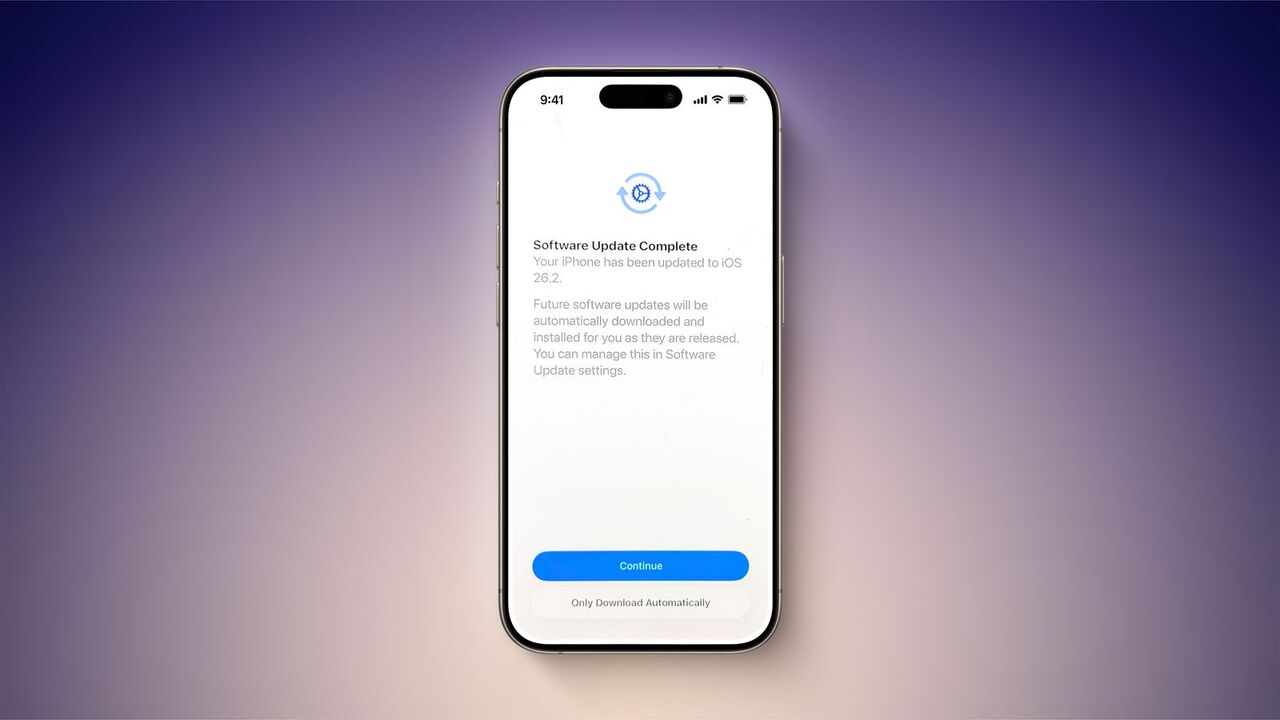
This notification warns that future software updates will be automatically downloaded and installed. If the user clicks “Continue” directly on this screen, the automatic installation option is automatically enabled.
To allow users to proceed without activating this setting, a small, easily overlooked text option, “Automatic Download Only,” is also displayed on the screen. However, users tend to skip this step quickly, making it easy to overlook this subtle detail and thus unintentionally enable automatic updates.
This new Apple practice does not apply to users who already have automatic software updates enabled. Furthermore, this warning does not appear for all users who have automatic installation disabled. Nevertheless, it is advisable for users to check their settings.
Users who previously had updates mysteriously installed on their devices without manual intervention may have encountered a similar situation. It’s also suggested that Apple might quietly offer this option with a future update.
If users accidentally enabled automatic updates during iOS 26.2 installation, they can easily revert this setting. To do this, simply go to Settings > General > Software Update > Automatic Updates and turn off the relevant option. From this section, users can make detailed choices such as allowing automatic update downloads or completely disabling the automatic installation of system files.