
WhatsApp Develops New Channel Migration Tool for Android Users


WhatsApp is currently refining a new channel migration tool for its Android application, as identified in the recent 2.26.43.2 beta release. This feature is designed to simplify the user experience by allowing individuals to move their followed channels from the dedicated Updates tab directly into the main Chats tab. By integrating this functionality, the messaging platform aims to streamline how users manage their content streams. The company is incorporating artificial intelligence to provide smart recommendations based on individual interaction patterns, ensuring that the most relevant channels are prioritized while others are archived to maintain a clean and efficient interface.
- WhatsApp is actively developing an automated system to migrate channels into the primary Chats tab.
- An AI-driven recommendation engine organizes content based on user engagement metrics.
- Users retain full authority to override automated suggestions or unfollow specific channels during the migration process.
- The current Updates tab will be replaced by a new Contacts tab to improve navigation efficiency.
Smart Recommendations Improve Daily User Experience
To address the growing clutter caused by an increasing number of followed channels, WhatsApp is adopting a more intelligent management strategy. The newly developed tool evaluates user interaction frequency to determine the ideal placement for each channel. Highly active channels are recommended to be pinned or moved to the top of the chat list, while less frequently accessed content is automatically suggested for the archive folder. This approach ensures that users encounter only the most pertinent information upon opening the application, while secondary content remains easily accessible without disrupting daily conversations.
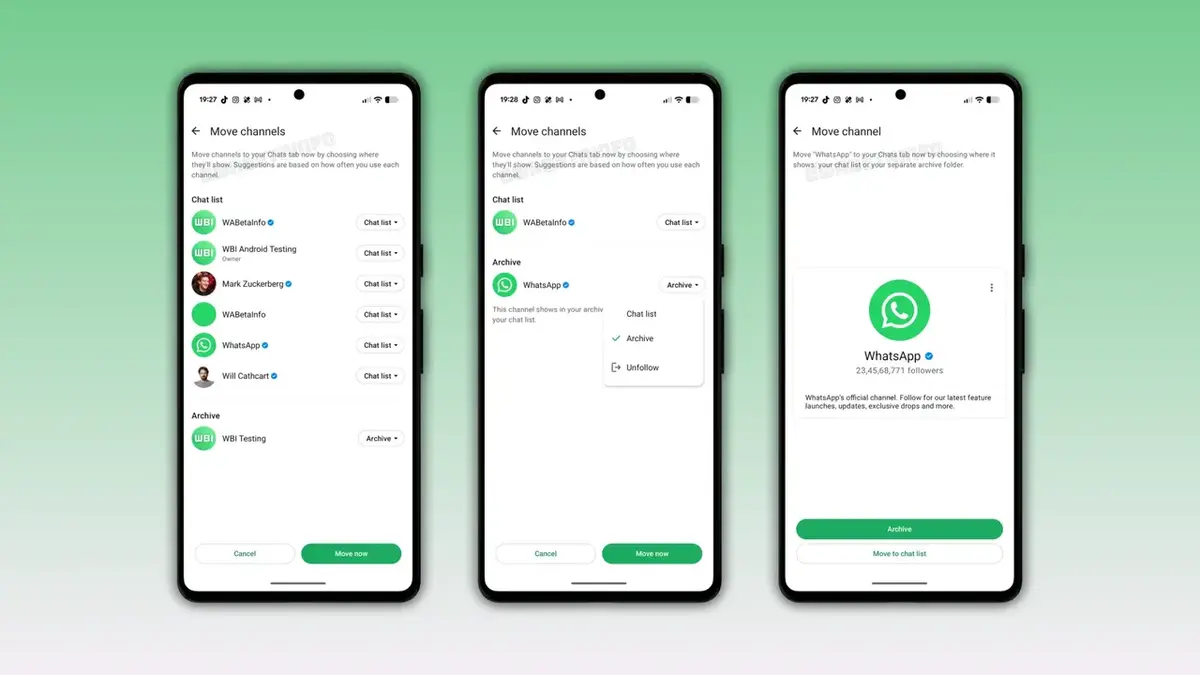
Users Retain Control Over the Migration Process
The design philosophy behind this migration tool prioritizes user agency and customization. Within the migration dashboard, WhatsApp provides an interactive interface featuring individual dropdown menus for every followed channel. This allows users to review the AI’s suggestions and manually adjust the destination of any channel before confirming the move. A “Move Now” button allows for a bulk update, but the granularity of the settings ensures that no user is forced into an unwanted layout. Additionally, the tool includes a direct option to unfollow channels that no longer align with the user’s interests, further cleaning up the chat environment.
Updates Tab Will Be Replaced by a Contacts Tab
A significant interface overhaul will accompany the integration of channels into the Chats section. Once the migration process concludes, the existing Updates tab will become redundant and will be phased out of the application. In its place, WhatsApp is developing a dedicated Contacts tab, which will provide users with real-time visibility into online contacts and more efficient access to their address books. This shift is intended to create a more cohesive and logical flow within the application’s navigation, centralizing communication tools and content management into a single, unified interface.
Tool Remains in the Early Development Stage
It is important to note that this channel migration feature is currently in the early stages of development and has not yet been deployed to the beta testing channel. The company plans to refine the system based on internal testing before rolling it out in a future stable update for all Android users. As of now, no official timeline for the public release has been disclosed. We will continue to monitor these developments closely to provide users with updates regarding this significant change to the application interface.
How do you feel about the plan to merge channels into the Chats tab? Do you believe this integration will enhance your daily workflow, or are you concerned that it might create unnecessary clutter in your conversation list? We invite you to share your thoughts and predictions in the comments section below.
Your comment has been submitted,
it will be published after approval.