
WhatsApp Web Introduces 27 New Customizable Chat Themes


WhatsApp has officially launched a significant update for its web and Windows desktop applications, introducing a long-awaited personalization feature that allows users to customize their chat interfaces. Rolling out gradually to users worldwide, the update includes 27 distinct chat themes that automatically adjust both the conversation bubble colors and the background wallpapers simultaneously. This enhancement aims to provide a more tailored digital environment, enabling individuals to reflect their personal style within their messaging experience. The feature is currently being integrated into the platform’s settings, offering a streamlined way for users to transform the aesthetics of their digital communications.
- WhatsApp has released 27 unique chat themes for its web and Windows desktop platforms.
- These themes synchronize both chat bubble colors and background wallpaper settings automatically.
- Customization choices remain private and visible only to the individual user who applies them.
- Users can preview their selected themes in real-time before finalizing any changes.
WhatsApp Web Has Been Testing Chat Themes for Months
Development on this personalization suite began earlier this year, with initial reports from May indicating that engineers were testing up to 39 different design variations. The goal was to provide a flexible system where users could apply a universal theme to all conversations or assign specific styles to individual threads. During these early testing phases, the development team also explored eight vibrant wallpaper options to complement the color schemes. Throughout the process, the company maintained that these visual modifications would remain local, ensuring that privacy is upheld for all parties involved in a chat.
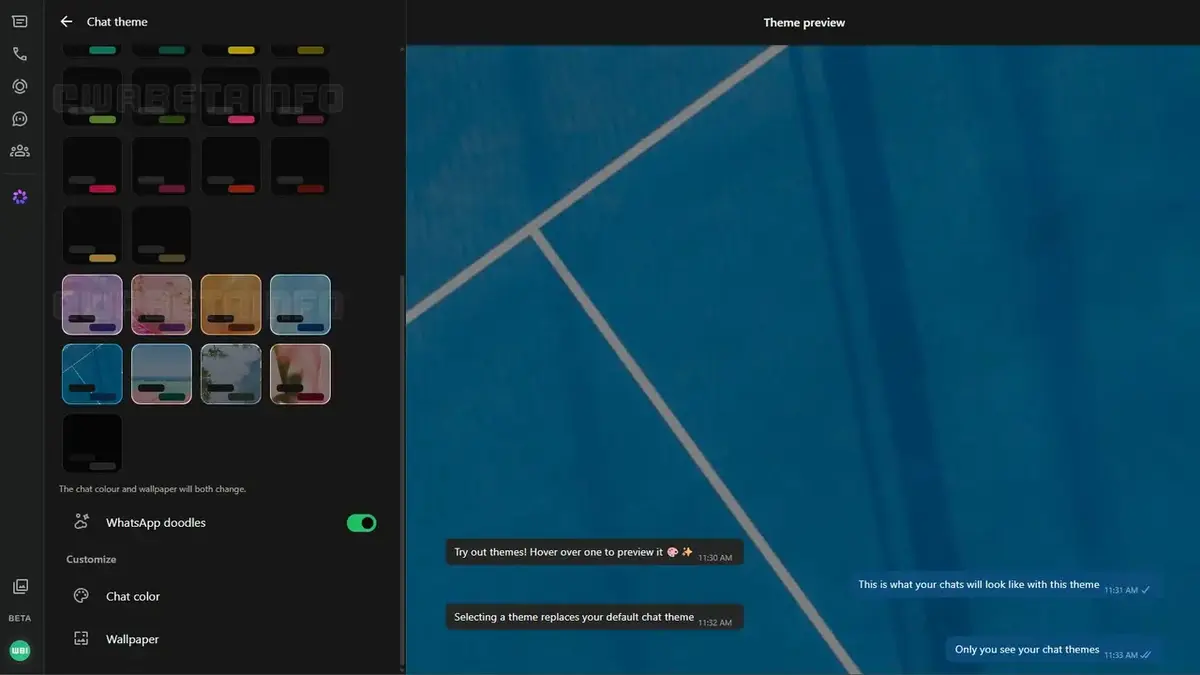
Chat Themes Are Now Available for Web Users
Following several months of refinement, the feature is now accessible through the settings menu under the ‘Chat theme’ section. WhatsApp has implemented a user-friendly grid layout that displays all 27 options, allowing for easy navigation and selection. A notable addition is the real-time preview tool, which displays how the chosen theme will appear in the conversation window before it is applied. While some users may need to be enrolled in the beta program to access these tools immediately, the update is expected to reach the entire user base over the coming weeks.
Themes Provide a Simplified Customization Process
The new system simplifies the design process by bundling colors and wallpapers into pre-set themes, removing the need for manual configuration. When a user selects a theme, the interface automatically adjusts to match the chosen aesthetic. If a user wishes to revert to the standard appearance, they can simply select the default option at the top of the menu. This design philosophy ensures that even users who are not tech-savvy can easily enhance the visual appeal of their messaging sessions.
Users Retain Full Control Over Visual Settings
Beyond the pre-set themes, WhatsApp allows for further manual adjustments for those who prefer a unique touch. Users retain the ability to independently select specific wallpapers and color palettes if the existing themes do not meet their requirements. Furthermore, settings regarding the visibility of classic ‘doodle’ patterns on backgrounds can be toggled on or off, providing granular control over the final look. These options ensure that the platform remains flexible enough to accommodate various aesthetic preferences.
Privacy Remains a Core Focus
A critical aspect of this release is that all visual changes remain strictly private. When a user applies a theme, it does not affect the view of the other participants in the conversation. Currently, the platform does not synchronize these themes across different devices or with other contacts. While there have been reports that WhatsApp is experimenting with synchronization features, those capabilities have not yet been deployed to the public, keeping the current experience localized to the user’s browser or desktop application.
Have you had a chance to explore the new customization options on your WhatsApp Web interface yet? We would love to hear which theme you prefer or if you have any suggestions for future design improvements. Share your thoughts in the comments section below!
Your comment has been submitted,
it will be published after approval.