
Apple Introduces Custom Liquid Glass Settings for Improved UI


Tech giant Apple has officially announced a significant update to its operating system, introducing the highly anticipated Apple Liquid Glass settings to enhance user experience. Responding to widespread feedback regarding readability and interface transparency, the company is refining its aesthetic design language. This update, which is currently rolling out to improve digital ergonomics, allows users to adjust the transparency levels of the interface directly. By addressing concerns about menu visibility over complex wallpapers, Apple aims to balance its signature futuristic look with practical usability, ensuring that both aesthetic appeal and functional clarity are maintained for all users across its ecosystem.
- The new Apple Liquid Glass settings provide a slider mechanism for users to customize interface transparency levels.
- The update includes a redesign of sidebar elements to ensure seamless integration with screen edges.
- Apple is implementing a multi-layered icon structure to enhance visual depth and tactile interaction.
Transparency Control is Being Handed to the User
The original implementation of the Liquid Glass design language, while praised for its minimalist and futuristic appeal, presented distinct challenges for daily navigation. Many users reported that the semi-transparent layers obscured text and caused readability issues, particularly when combined with vibrant or high-contrast background images. 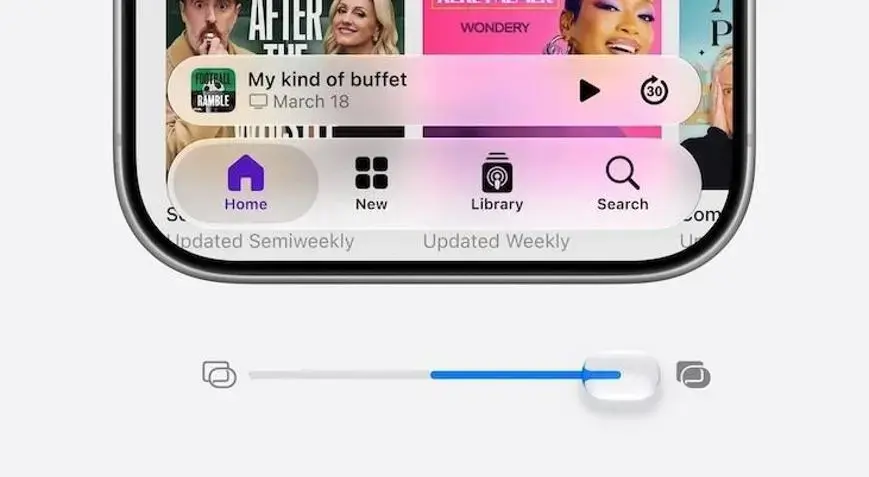
Apple is finally delivering the customization tools that professional users have requested to optimize their workflows.
With the forthcoming Apple Liquid Glass settings, the interface becomes highly adaptable. Users can now choose to completely disable the glass effect for a solid, opaque look, or adjust the transparency percentage to suit their specific visual preferences. This level of granular control is designed to reduce eye strain, especially for professionals who spend long hours working with text-heavy applications.
Sidebar Elements are Being Redesigned for Seamless Integration
Beyond transparency adjustments, the update introduces a comprehensive overhaul of interface architecture. Specifically, window sidebars are being extended to the very edges of the display. This design change eliminates the abrupt cutoff of glass effects, fostering a more cohesive and fluid transition between the application windows and the desktop background. 
The new architecture creates an immersive environment where the software feels like a natural extension of the hardware.
Furthermore, native applications will feature a new multi-layered design. By adding subtle depth to icons, the interface provides a more tactile, three-dimensional sensation. These adjustments, all manageable within the central Apple Liquid Glass settings menu, aim to unify the user experience. By prioritizing both form and function, Apple expects these refinements to foster greater user satisfaction and long-term engagement with its operating system.
We would love to hear your thoughts on these upcoming design changes; do you prefer a fully transparent aesthetic or a more traditional opaque interface for your daily work?
Your comment has been submitted,
it will be published after approval.