
Google Chrome Requires 20GB of Disk Space for Local AI


Google has officially updated its hardware requirements for users looking to leverage on-device artificial intelligence features within the Chrome browser. According to the latest documentation, the company now mandates that users maintain at least 20 GB of available disk space to support the local execution of sophisticated models such as Gemini Nano. This significant storage allocation is primarily reserved for the automated downloading, installation, and ongoing maintenance of AI components that function directly on the user’s hardware. By enforcing these strict criteria, Google ensures that high-performance browser features operate smoothly without compromising system stability or overall responsiveness.
- Chrome mandates a minimum of 20 GB of free storage to facilitate the installation of local artificial intelligence models.
- The browser restricts the deployment of on-device AI features to hardware configurations that meet specific performance and storage thresholds.
- Users retain the ability to disable local artificial intelligence functionalities through the browser settings menu at any time.
- Manual removal of AI-related system files does not prevent the browser from attempting to re-download the necessary components.
Disk Space Requirements Reflect Ongoing Operational Needs
While the core data for local artificial intelligence models typically occupies approximately 4 GB of space, Google has set the 20 GB threshold to accommodate more than just the initial installation. This expansive requirement accounts for critical background processes, including periodic model updates, temporary storage for complex data processing, and the maintenance of operational stability during intensive tasks. By maintaining this buffer, the browser ensures that artificial intelligence features can function effectively without interfering with the user’s primary operating system tasks.
Devices failing to meet the minimum free disk space requirement are automatically excluded from local AI feature support.
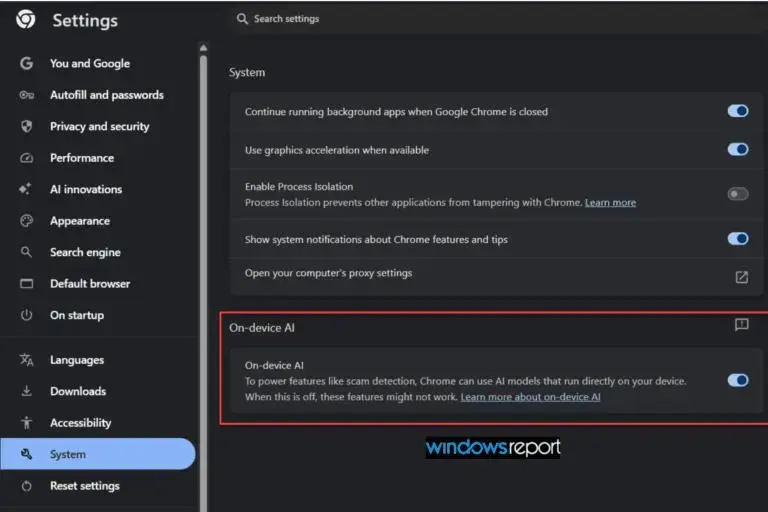
Users Can Manage Local AI Settings Manually
Recognizing that not all users prioritize browser-based artificial intelligence, Google has integrated a dedicated control toggle within Chrome’s settings. This interface allows individuals to disable the on-device AI functionality completely, which triggers the browser to purge existing model files and halt any scheduled background downloads. If a user decides to re-enable these features later, the browser performs a fresh scan of the hardware’s capabilities before initiating the download of necessary assets once more. For managed environments, administrators can enforce these preferences through standardized Chrome Enterprise policies to ensure consistency across corporate networks.
Google advises against the manual deletion of AI system files to prevent potential configuration errors.
Hardware Requirements Might Evolve in the Future
The tech giant has emphasized that the current hardware specifications are subject to change as the underlying technology matures. As developers continue to enhance the capabilities and complexity of generative AI models, the demand for local system resources is expected to grow accordingly. While browser-integrated artificial intelligence promises a more personalized and efficient user experience, these evolving standards may present significant challenges for users operating on machines with limited internal storage capacities. Staying informed about these technical prerequisites will be essential for users who wish to balance modern browser features with their available device resources.
Do you believe that allocating 20 GB of disk space is a reasonable trade-off for the performance benefits of local AI, or should Google prioritize more lightweight optimization? Share your perspective in the comments section below.
Your comment has been submitted,
it will be published after approval.