
Opera Android Browser Launches New Features for World Cup


Opera has officially unveiled a significant update for its Android browser, specifically tailored to enhance the experience for football fans following the upcoming World Cup. By integrating real-time score tracking and personalized match notifications, the company aims to streamline how users stay updated on the tournament. This strategic move follows extensive research conducted by Opera, involving over 77,000 users, which revealed that 86 percent of respondents intend to follow the matches closely. As fans prepare for the global event, the Opera Android browser positions itself as a primary hub for mobile sports enthusiasts seeking immediate access to match data and statistics.
- Opera updated its Android browser to include dedicated features for real-time World Cup match tracking and statistics.
- Research conducted by the company indicates that 86 percent of its user base plans to engage with the tournament coverage.
- The browser interface redesign improves access to live scores and personalized content for early-morning match viewing.
The new football-centric hub serves as a centralized point for managing match updates and comprehensive tournament statistics.
Dedicated Football Hub Simplifies Match Tracking
To support the massive scale of the tournament, which features 104 matches across 48 teams, Opera has introduced a specialized interface designed for seamless navigation. Given that 87 percent of surveyed fans expressed their intention to watch games even at unconventional hours, the browser’s new infrastructure prioritizes speed and accessibility. For users in regions like Turkey, where the tournament schedule forces matches into early morning time slots, the refined interface ensures that vital information remains accessible without unnecessary friction.

Browser Homepage Offers Enhanced Personalization
Beyond sports features, Opera has completely overhauled the start page of its Android browser to promote a more fluid user experience. This redesign facilitates a smoother transition between web searching and content consumption as soon as the application is launched. Users now possess increased control over their browsing environment, with the ability to customize quick-access icons into various shapes, including circular or square formats. An integrated weather widget has also been added, providing users with essential local climate data at a glance.
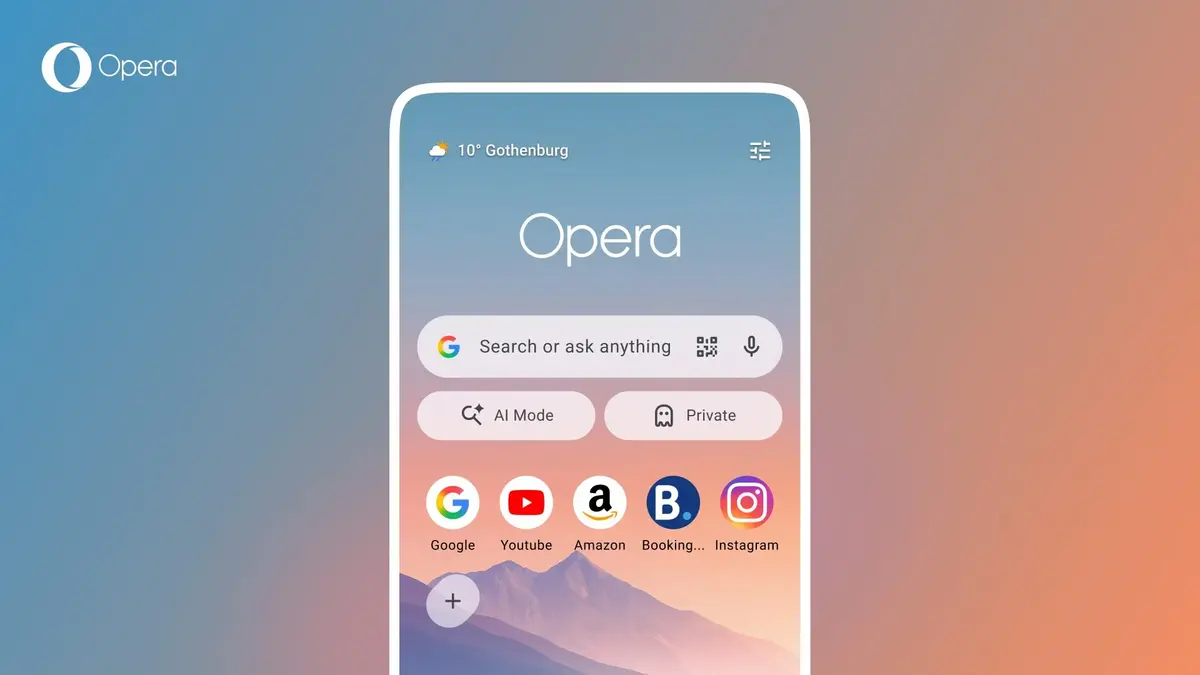
New shortcuts allow for direct access to AI-powered features and private browsing sessions directly from the main screen.
Interface Updates Streamline User Navigation
The update reflects Opera’s commitment to providing a highly customizable and efficient mobile browser. By allowing users to configure their start page according to individual preferences, the company seeks to differentiate its product in a competitive mobile market. These structural changes are not merely cosmetic; they represent a functional shift toward a more user-centric design that balances specialized entertainment needs with daily browsing utility. As mobile technology continues to evolve, browser platforms are increasingly focusing on these types of integrated, feature-rich updates to maintain user engagement.
We are eager to hear your thoughts on these new football-oriented features and the interface redesign in the Opera Android browser, so please share your opinions in the comments section below.
Your comment has been submitted,
it will be published after approval.