
Samsung Galaxy Users Report Critical One UI 9 Update Errors

A growing number of Samsung Galaxy users are reporting a significant Samsung One UI 9 güncelleme sorunu that leaves their devices trapped on the setup screen following the latest firmware installation. This issue, which primarily affects newer models including the Galaxy S24, S25, and S26 series along with various foldable devices, prevents users from accessing their home screens. Upon completing the update, the device displays an XML “Access Denied” error, effectively creating a boot loop that hinders normal operation. While the phones remain functional in a limited capacity, the inability to bypass the setup wizard has caused widespread concern among the global user base.
- The One UI 9 update triggers an XML “Access Denied” error during the initial device setup phase.
- Affected models include the Galaxy S24, S25, and S26 series, as well as multiple foldable smartphone units.
- Industry experts suspect that server-side security measures against software leaks caused this technical malfunction.
- Users can bypass the error by disabling internet connectivity during the setup process.
The technical disruption appears to be tied to the final stages of the device configuration process. When the operating system attempts to finalize its setup after the One UI 9 installation, the error message prevents the user from proceeding to the main interface. 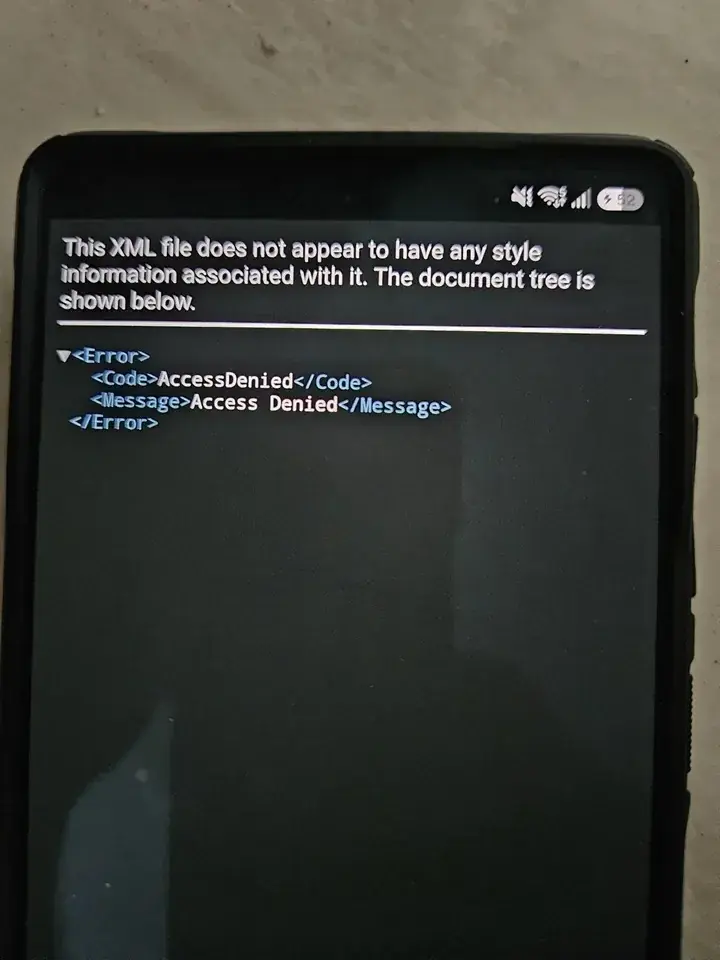 This situation is particularly frustrating for users who rely on their smartphones for daily tasks. Although the exact scale of the problem remains under investigation, reports indicate that the error is affecting a diverse range of high-end Samsung devices globally.
Experts Suggest Potential Causes for the Error
Tech analysts and industry observers have begun speculating on the root cause of this system failure. Fahad Ali Javed, a prominent tech tipster, suggests that the error may stem from a server-side modification implemented by Samsung to prevent unauthorized software leaks. While this theory offers a plausible explanation for the sudden onset of the issue, the company has yet to provide an official statement or confirm that such measures triggered the error. Until an official update is provided, owners of the affected models remain in a state of uncertainty regarding the stability of their devices.
Users Can Bypass the Setup Screen Manually
Fortunately, affected users have identified several workarounds that allow them to regain control of their devices without performing a factory reset or losing personal data. The most successful method involves booting the phone into Safe Mode and ensuring that all internet connections are completely disabled. By holding the volume down and power buttons simultaneously during a restart, users can access the restricted mode, where disconnecting Wi-Fi or removing the SIM card allows the setup process to bypass the problematic server check.
Once the internet connection is severed, the device can often complete the setup sequence and proceed to the home screen. Some users have reported that simply restarting the device or turning off their local Wi-Fi router is sufficient to resolve the loop. These temporary fixes suggest that the issue is indeed related to server-side authentication, as the device attempts to verify the software installation in real-time. Despite these solutions, a permanent fix from the manufacturer is still awaited by the community.
Have you encountered the “Access Denied” error after updating your device to One UI 9, and did the suggested workarounds resolve the problem for you? We invite you to share your experiences and any additional troubleshooting tips you have discovered in the comments section below.
Your comment has been submitted,
it will be published after approval.