
Spotify is replacing its heart button with a new “+” icon


Spotify is on the agenda with an interface change this time. The “heart” button, which has been in Spotify for a long time, is replaced by the “+” button. The new and improved Plus (+) button now gives users a more streamlined way to save their favorite music and podcasts. Although the dual-purpose “+” button prepared within the scope of this step is not a huge change, it looks useful. The button will soon be activated for everyone.
Spotify’s new “+” button will have two functions
Previously, users used the heart button to add songs to the library on Spotify. To add any song to a playlist on the platform, it was necessary to click on the three dots next to the song and find the “add to playlist” option from the menu that appeared. Now, a single tap will be enough for this. In short, this innovation will reduce two functions to one button.
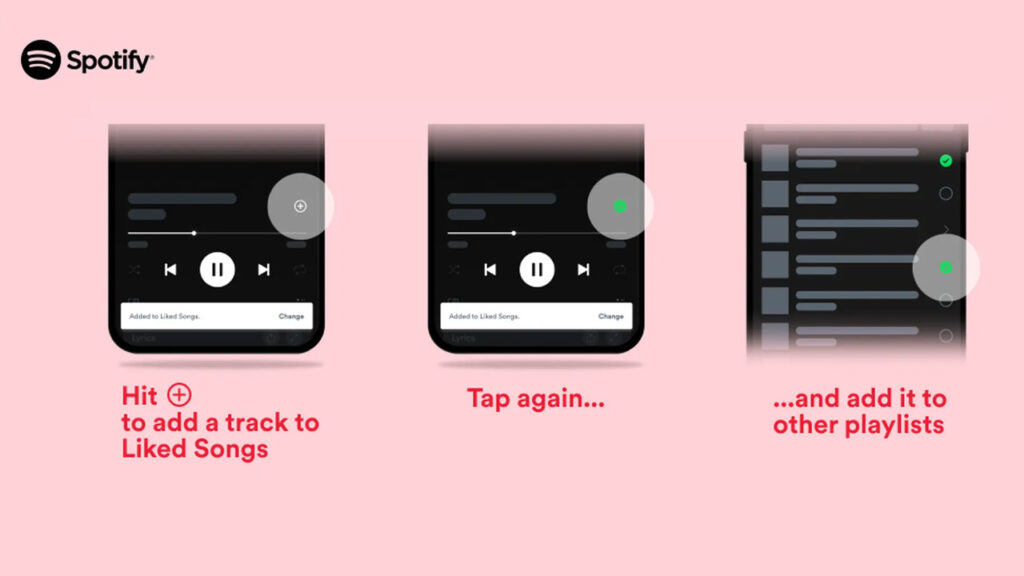
Making a statement on this issue, the company officially stated the following: “Starting today, we’re consolidating the Heart icon and the “Add to playlist” icon into a single symbol: the Plus (+) button. When you hit Plus (+), you’ll be able to save and choose the destination for any song, playlist, or podcast with a simple tap. This upgrade is the latest step in our ongoing work to create a more intuitive experience—all leading to an easier way for you to engage with the music and podcasts you love.”
- Tap to save: To save a song or podcast episode, tap the Plus (+) button to the right of the song or episode title in the Now Playing view. After your choice has been successfully added to Liked Songs or Your Episodes, the Plus (+) will become a green check. You can change the destination of your saved content by tapping the green check.
- Easily add an entire album to Your Library: Just click the Plus (+) button to add your favorite album, playlist, or audiobook to Your Library. You’ll see the green check once it’s been successfully added.
Your comment has been submitted,
it will be published after approval.