
WhatsApp Rolls Out Redesigned Settings Tab for iOS Users

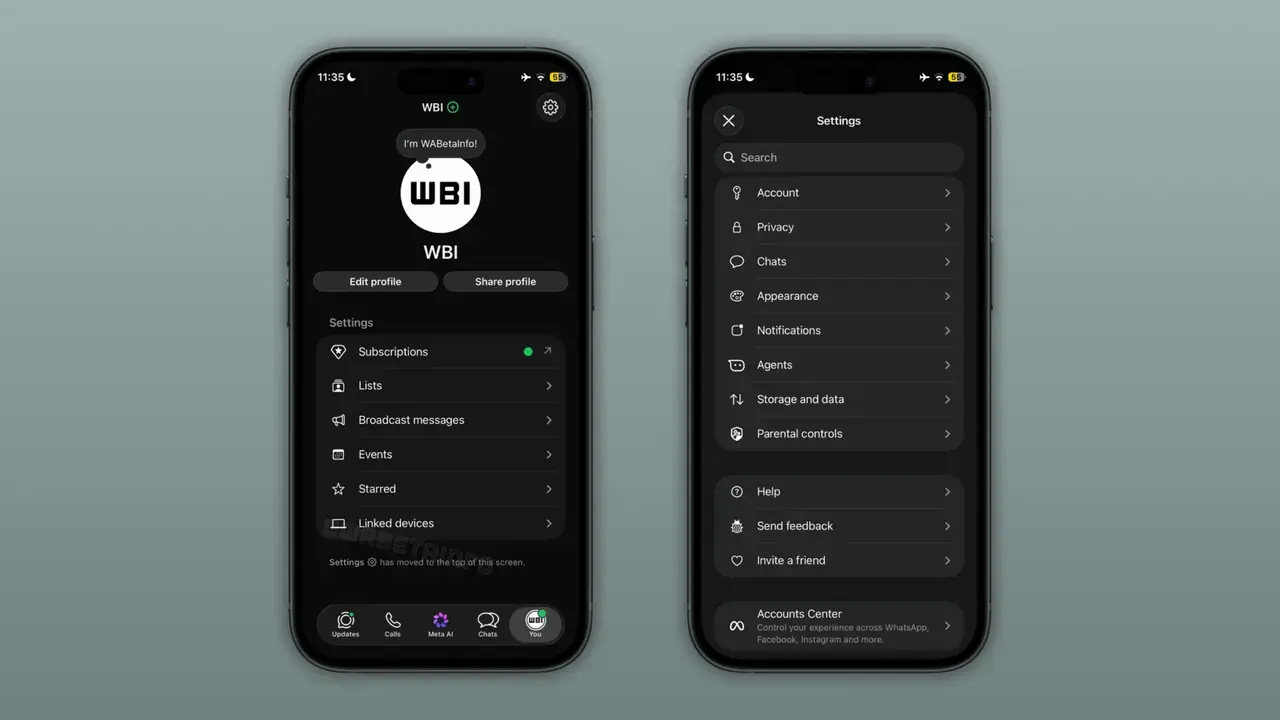
WhatsApp has officially begun the rollout of a significantly redesigned Settings tab for its iOS application, aiming to streamline the user experience for millions of people worldwide. This update, introduced via the iOS beta version 26.40.10.76, fundamentally restructures how users navigate their account preferences. By splitting the interface into two distinct sections, the platform seeks to declutter the increasingly complex menu that has grown alongside the addition of numerous new features. While the update is currently limited to a select group of TestFlight beta testers, the company plans to expand this intuitive layout to all iOS users in the coming weeks.
- WhatsApp updated its iOS application with a simplified two-section layout for the Settings tab.
- Frequent user actions are consolidated under a new “You” profile section for quicker accessibility.
- Secondary technical configurations are relocated to a specialized sub-menu accessible via a gear icon.
- The current deployment phase is restricted to participants of the TestFlight beta program.
Interface Design Splits Into Two Distinct Sections
The new design philosophy behind the WhatsApp interface addresses the growing challenge of managing an expanding list of features. By moving away from the traditional, single-column list, the platform has created a more modular approach. The primary “You” section now serves as the central hub for personal identity and frequently used tools. Users can view their profile pictures, update status messages, and manage essential settings such as linked devices, broadcast lists, and subscription details with minimal effort. This concentration of primary features drastically reduces the time spent scrolling through menus.
Secondary Settings Menu Becomes More Organized
For configuration options that are accessed less frequently, WhatsApp has implemented a dedicated secondary menu. By tapping the gear icon located in the top-right corner of the interface, users gain access to a comprehensive suite of technical settings. This area houses critical components including privacy controls, security verification, storage management, and notification preferences. The inclusion of an integrated search bar ensures that users can still navigate through these technical layers without losing time, maintaining a high level of efficiency even within a deeper menu structure.
Design Changes Reflect Growing Feature Sets
The core motivation behind this structural overhaul is to improve the discoverability of features within the application. As WhatsApp has evolved into a multifunctional communication suite, the Settings page had become a lengthy and often overwhelming list of options. By separating daily functional needs from long-term system configurations, the developers have successfully created a more logical hierarchy. This strategic change allows the application to accommodate new updates in the future without compromising the clarity or user-friendliness of the primary interface.
Navigation Processes Become More Efficient
This update represents a broader commitment by the Meta-owned platform to refine its overall navigation strategy. Throughout the current year, WhatsApp has introduced several modular updates, including improvements to group chat management and conversation history navigation. The redesign of the Settings tab is a logical progression in this simplification effort, ensuring that the application remains accessible as it adds more sophisticated functionality. By focusing on a section-based navigation flow, the developers aim to minimize the cognitive load required for everyday account maintenance.
Limited Testing Phase Continues for Developers
At present, the new interface is exclusively available to users participating in the TestFlight beta program. Although a global release date has not been officially announced, the systematic rollout suggests that the company is gathering feedback to polish the final experience. Users who do not see these changes immediately should expect a wider release as the testing phase concludes. The development team continues to monitor user interaction data to make minor refinements to the layout before the final public launch.
How do you feel about the new, cleaner organization of the WhatsApp Settings tab? Do you believe this two-section structure will simplify your daily navigation through the app, or do you prefer the classic layout? Share your thoughts and experiences with the new interface in the comments section below.
Your comment has been submitted,
it will be published after approval.